在css中,对元素设置 transform 属性会创建一个新的层叠上下文(stacking context),这会导致该元素脱离文档流中的固定定位环境,从而表现为 fixed 失效。具体来说,当父级或自身应用了非 none 的 transform 时,浏览器会将该元素视为“包含块”的参照物发生变化,通常转而相对于其最近的已定位祖先元素(即 position: relative/absolute/fixed)进行定位,而非视口。要解决这个问题,应避免在 fixed 元素的祖先链上设置 transform,或者使用 position: sticky 配合 top 值来模拟固定效果。
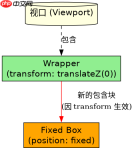
为什么 transform 会让 fixed 失效
这是因为 transform 属性的存在会触发新的层叠上下文生成,同时改变包含块的计算方式。根据 CSS 规范,如果元素的 transform 不为 none,那么它的包含块将不再是视口,而是由它最近的具有定位属性(position 值为 relative、absolute 或 fixed)的祖先元素决定。这意味着原本应该相对于视口固定的元素,现在会相对于那个祖先元素固定。如果祖先元素发生了滚动或变换,子元素的 fixed 位置也会随之移动,从而失去了“固定”在屏幕上的视觉效果。
/* HTML */
<div class="wrapper">
  <div class="fixed-box">Fixed Box</div>
</div>

/* CSS */
.wrapper {
  transform: translateZ(0); /* 关键:创建了层叠上下文和新的包含块 */
  height: 2000px;
  overflow-y: scroll;
}

.fixed-box {
  position: fixed;
  top: 20px;
  right: 20px;
  width: 100px;
  height: 100px;
  background-color: red;
}
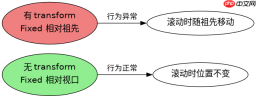
在上述代码中,尽管 .fixed-box 设置了 position: fixed,但由于其祖先 .wrapper 拥有 transform: translateZ(0),.fixed-box 实际上会相对于 .wrapper 进行定位。当 .wrapper 滚动时,.fixed-box 会随着 .wrapper 的内容一起滚动,而不是固定在视口右上角。
如何验证 transform 对包含块的影响
我们可以通过对比有无 transform 的两种情况来验证这一行为。在没有 transform 的情况下,fixed 元素始终相对于视口;而在有 transform 的情况下,它相对于最近的定位祖先。我们可以创建一个简单的测试页面,观察元素在不同滚动状态下的位置变化。

htmlq 是一个命令行工具,使用 CSS 选择器从 HTML 中提取内容,相当于 jq 的 HTML 版本。该工具使用 Rust 编写,允许你通过 CSS 选择器将 HTML 管道化,直接从终端提取文本、属性和结构化内容。
    <meta charset="UTF-8"><title>Transform Fixed Test</title><style>
        body { margin: 0; height: 2000px; }
        .container {
            height: 500px;
            border: 2px solid blue;
            /* 取消注释下一行以测试 transform 影响 */
            /* transform: translateZ(0); */
        }
        .fixed-el {
            position: fixed;
            top: 50px;
            left: 50px;
            width: 100px;
            height: 100px;
            background-color: red;
            color: white;
            display: flex;
            align-items: center;
            justify-content: center;
        }
    </style><div class="container">
        <div class="fixed-el">Fixed</div>
    </div>
运行上述代码,首先不启用 transform,滚动页面,红色方块会始终停留在视口左上角。然后启用 transform: translateZ(0),再次滚动页面,你会发现红色方块随着蓝色容器的内容一起滚动,因为它现在相对于 .container 定位,而 .container 是文档流的一部分,随页面滚动。
基于 translateZ(0) 的具体问题与替代方案
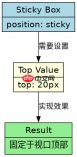
在实际开发中,我们经常为了开启 GPU 加速或解决某些渲染 bug 而给元素添加 translateZ(0) 或 will-change: transform。这种情况下,如果该元素是 fixed 定位元素的祖先,就会导致 fixed 失效。一个常见的替代方案是使用 position: sticky。虽然 sticky 需要指定 top 值,但它不会创建新的包含块,因此可以完美模拟 fixed 的效果,且不受 transform 影响。
.sticky-box {
  position: sticky;
  top: 20px;
  right: 20px;
  width: 100px;
  height: 100px;
  background-color: green;
}
将 position: fixed 替换为 position: sticky 并设置 top: 20px,元素将在滚动到顶部时固定在该位置,即使其祖先元素有 transform,也不会受到影响。这是目前最稳健的解决方案之一,尤其适用于现代浏览器环境。
前端入门到VUE实战笔记:立即使用
在学习笔记中,你将探索 前端 的入门与实战技巧!