JUnit怎么让数据库测试自动回滚?
在junit中实现数据库测试自动回滚,核心是利用spring框架提供的声明式事务管理功能。具体做法是在测试类或测试方法上添加@transactional注解,并配合@rollback(true)(默认即为true)使用。这样,每个测试方法执行完毕后,spring会自动调用事务的rollback()方法,撤销对数据库的所有修改,确保测试环境的数据隔离和干净状态。

测试事务配置方法有哪些细节?
配置测试事务时,除了基本的注解,还需要关注事务传播行为和隔离级别,以确保在不同场景下(如嵌套测试、多数据源)能正确回滚。通常需要在测试类上配置@TransactionConfiguration或使用更现代的@TestPropertySource结合事务管理器Bean来定义行为。关键在于确认事务管理器是否正确注入,以及是否在集成测试环境中正确加载了Spring上下文。

UpdateStock - A股本地数据库
下载
UpdateStock MCP 服务技能 —— 通过 stdio 模式调用 UpdateStock 脚本, 提供 A 股 DuckDB 数据库管理功能:创建数据库、全量/增量更新股票数据、查询股票行情。 设计的数据库方案兼容 QuantAll(全A解析)计算引擎。 触发条件:用户提到"UpdateStock"、"创建股票数据库"、"更新股票数据"、"获取股票数据"等。
基于程序中某个输入、条件或结果的具体问题
当测试方法内部手动调用了PlatformTransactionManager或使用了TransactionTemplate时,默认的@Transactional回滚机制可能会失效或产生冲突。此时需要明确区分容器管理的事务与编程式事务,确保在混合使用时,回滚逻辑符合预期,避免部分数据被提交而另一部分被回滚的不一致状态。
import org.junit.Test;
import org.junit.runner.RunWith;
import org.springframework.beans.factory.annotation.Autowired;
import org.springframework.test.context.ContextConfiguration;
import org.springframework.test.context.junit4.SpringJUnit4ClassRunner;
import org.springframework.transaction.annotation.Transactional;
import org.springframework.transaction.annotation.Rollback;

@RunWith(SpringJUnit4ClassRunner.class)
@ContextConfiguration(classes = {TestConfig.class})
@Transactional
@Rollback(true)
public class DatabaseTest {

    @Autowired
    private UserRepository userRepository;

    @Test
    public void testUserCreation() {
        User user = new User();
        user.setName("TestUser");
        userRepository.save(user);
        // 验证用户存在
        assert userRepository.findById(1L).isPresent();
    }
}
import org.junit.Test;
import org.junit.runner.RunWith;
import org.springframework.beans.factory.annotation.Autowired;
import org.springframework.jdbc.core.JdbcTemplate;
import org.springframework.test.context.ContextConfiguration;
import org.springframework.test.context.junit4.SpringJUnit4ClassRunner;
import org.springframework.transaction.annotation.Transactional;
import org.springframework.transaction.annotation.Propagation;
import org.springframework.transaction.interceptor.TransactionInterceptor;

@RunWith(SpringJUnit4ClassRunner.class)
@ContextConfiguration(classes = {TestConfig.class})
@Transactional(propagation = Propagation.REQUIRED)
public class NestedTransactionTest {

    @Autowired
    private JdbcTemplate jdbcTemplate;

    @Test
    public void testNestedTransaction() {
        jdbcTemplate.execute("INSERT INTO users (name) VALUES ('Nested')");
        // 模拟内部事务逻辑
        // 由于外层是REQUIRED,内层共享同一事务,最终整体回滚
    }
}
digraph G {
    rankdir=LR;
    node [shape=box, style=filled, fillcolor=lightblue, fontsize=16];
    edge [fontsize=16];

    TestMethod [label="测试方法"];
    TransactionalAnnotation [label="@Transactional", shape=diamond, fillcolor=yellow];
    SpringContainer [label="Spring容器", shape=ellipse, fillcolor=lightgreen];
    Database [label="数据库", shape=cylinder, fillcolor=gray];
    RollbackAction [label="执行回滚", shape=ellipse, fillcolor=red];

    TestMethod -> TransactionalAnnotation;
    TransactionalAnnotation -> SpringContainer;
    SpringContainer -> Database;
    SpringContainer -> RollbackAction;
    RollbackAction -> Database;
}
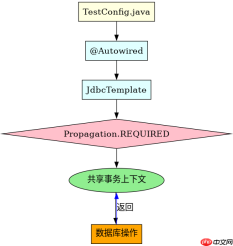
digraph G {
    rankdir=TB;
    node [shape=box, style=filled, fillcolor=white, fontsize=16];
    edge [fontsize=16];

    ConfigClass [label="TestConfig.java", fillcolor=lightyellow];
    Autowired [label="@Autowired", fillcolor=lightcyan];
    JdbcTemplate [label="JdbcTemplate", fillcolor=lightcyan];
    PropagationRequired [label="Propagation.REQUIRED", shape=diamond, fillcolor=pink];
    SharedTransaction [label="共享事务上下文", shape=ellipse, fillcolor=lightgreen];
    DBOperation [label="数据库操作", shape=rectangle, fillcolor=orange];

    ConfigClass -> Autowired;
    Autowired -> JdbcTemplate;
    JdbcTemplate -> PropagationRequired;
    PropagationRequired -> SharedTransaction;
    SharedTransaction -> DBOperation;
    DBOperation -> SharedTransaction [label="返回", color=blue];
}
digraph G {
    rankdir=LR;
    node [shape=box, style=filled, fillcolor=lightgray, fontsize=16];
    edge [fontsize=16];

    ManualTx [label="编程式事务\nTransactionTemplate", fillcolor=orange];
    ContainerTx [label="容器管理事务\n@Transactional", fillcolor=lightblue];
    ConflictCheck [label="检查事务边界", shape=diamond, fillcolor=yellow];
    RollbackConflict [label="回滚冲突风险", shape=ellipse, fillcolor=red];
    ConsistentState [label="保持一致性", shape=ellipse, fillcolor=green];

    ManualTx -> ConflictCheck;
    ContainerTx -> ConflictCheck;
    ConflictCheck -> RollbackConflict [label="不一致", color=red];
    ConflictCheck -> ConsistentState [label="一致", color=green];
}