






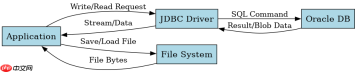
在java 11中读取和写入oracle的blob大字段,核心在于利用jdbc提供的流式接口。写入时通过`setbinarystream()`将数据以字节流形式传入;读取时调用`getbinarystream()`获取输入流并循环读取至文件。这种方式避免了将整个大对象加载到内存中,有效防止了oom(内存溢出)。
如何向数据库插入一个BLOB对象
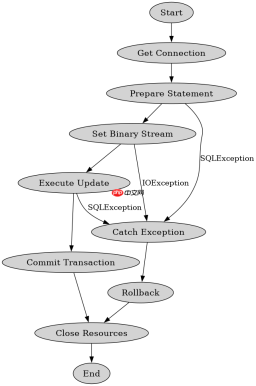
向数据库插入BLOB时,需要使用PreparedStatement的`setBinaryStream`方法。首先创建一个空的BLOB占位符或直接传入InputStream,然后提交事务。关键在于确保连接的事务自动提交关闭,并在finally块中正确关闭资源。
import java.sql.*;
import java.io.*;

public class BlobInsertExample {
    public static void main(String[] args) {
        String url = "jdbc:oracle:thin:@localhost:1521:orcl";
        String user = "scott";
        String password = "tiger";

        // 假设有一个二进制文件要存入
        File file = new File("example.pdf");

        try (Connection conn = DriverManager.getConnection(url, user, password);
             FileInputStream fis = new FileInputStream(file)) {

            conn.setAutoCommit(false);
            String sql = "INSERT INTO documents (id, content) VALUES (?, ?)";
            try (PreparedStatement pstmt = conn.prepareStatement(sql)) {
                pstmt.setInt(1, 1001);
                // 设置BLOB流,长度设为-1表示未知长度,由驱动处理
                pstmt.setBinaryStream(2, fis, (int) file.length());
                pstmt.executeUpdate();
                conn.commit();
            }
        } catch (SQLException | IOException e) {
            e.printStackTrace();
        }
    }
}
上述代码演示了如何将本地文件作为BLOB插入。注意`setBinaryStream`的第三个参数指定了流的长度,这有助于驱动程序优化缓冲区。如果长度未知,可以传-1。执行后,数据库中`documents`表的`content`列将包含该文件的二进制数据。
如何从数据库读取BLOB并保存为文件
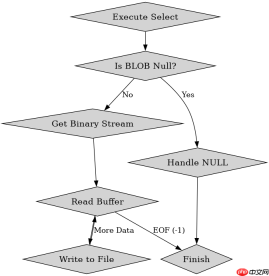
读取BLOB的过程与写入相反。使用`SELECT`查询获取BLOB列,然后通过`ResultSet.getBinaryStream()`获取输入流。接着创建一个输出流指向目标文件,使用缓冲字节数组循环读取输入流,直到返回-1表示结束。最后关闭所有流并提交或回滚事务。

import java.sql.*;
import java.io.*;

public class BlobReadExample {
    public static void main(String[] args) {
        String url = "jdbc:oracle:thin:@localhost:1521:orcl";
        String user = "scott";
        String password = "tiger";

        try (Connection conn = DriverManager.getConnection(url, user, password)) {
            String sql = "SELECT id, content FROM documents WHERE id = ?";
            try (PreparedStatement pstmt = conn.prepareStatement(sql)) {
                pstmt.setInt(1, 1001);
                try (ResultSet rs = pstmt.executeQuery()) {
                    if (rs.next()) {
                        int id = rs.getInt(1);
                        Blob blob = rs.getBlob(2);

                        try (InputStream is = blob.getBinaryStream();
                             FileOutputStream fos = new FileOutputStream("downloaded.pdf")) {

                            byte[] buffer = new byte[4096];
                            int bytesRead;
                            while ((bytesRead = is.read(buffer)) != -1) {
                                fos.write(buffer, 0, bytesRead);
                            }
                            System.out.println("File downloaded successfully for ID: " + id);
                        }
                    }
                }
            }
        } catch (SQLException | IOException e) {
            e.printStackTrace();
        }
    }
}
此代码展示了如何安全地读取BLOB。关键点在于使用try-with-resources确保流被正确关闭。`blob.getBinaryStream()`返回的是底层数据的流,直接读取即可。对于非常大的BLOB,保持合理的缓冲区大小(如4KB或8KB)可以在内存使用和I/O效率之间取得平衡。
当BLOB内容为空时会发生什么
当尝试读取或写入空的BLOB字段时,行为取决于具体的操作和数据库状态。如果在插入时未提供BLOB值,Oracle通常将其存储为NULL。在读取时,如果BLOB列为NULL,`rs.getBlob()`将返回null,此时调用`getBinaryStream()`会抛出NullPointerException。因此,在读取前必须检查BLOB是否为null。对于写入,如果传入的InputStream长度为0,数据库将存储一个空的BLOB对象(非NULL),其长度为0。在处理此类边界情况时,显式的null检查是必要的。
Java免费学习笔记:立即使用
解锁 Java 大师之旅:从入门到精通的终极指南


