在css grid中直接对 grid-template-rows 属性添加 transition 无法实现平滑动画,因为浏览器不支持网格模板属性的过渡。要实现行高变化的平滑效果,必须使用 grid-template-rows: auto 配合 minmax() 或显式高度,并借助 height 或 max-height 的过渡来模拟,或者使用 @property 注册自定义属性(需现代浏览器支持)。最通用的做法是将行高控制交给子元素的 height 或容器的 max-height,通过 javascript 切换类名触发 css transition。

为什么grid-template-rows不能直接过渡?
grid-template-rows 是布局定义属性,浏览器在计算网格轨道大小时会立即应用新值,跳过中间状态。因此,试图对 grid-template-rows 设置 transition 无效。解决方法是避免直接修改该属性,转而修改影响轨道大小的其他可过渡属性,如子元素的 height 或 max-height。
.grid-container {
  display: grid;
  grid-template-rows: auto;
}

.grid-item {
  height: 0;
  overflow: hidden;
  transition: height 0.3s ease;
}

.grid-item.expanded {
  height: 200px;
}
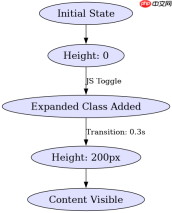
上述代码中,grid-template-rows: auto 允许行根据内容自适应。当给 .grid-item 添加 expanded 类时,其 height 从 0 变为 200px,由于设置了 transition,高度变化会平滑过渡。注意 overflow: hidden 防止内容溢出。
如何使用@property实现grid-template-rows过渡?
在现代浏览器中,可以使用 @property 规则注册自定义属性,使其成为可过渡的类型。例如,注册一个名为 --row-height 的自定义属性,类型为长度值,然后将其应用到 grid-template-rows 中。这样,改变 --row-height 的值即可触发平滑过渡。

htmlq 是一个命令行工具,使用 CSS 选择器从 HTML 中提取内容,相当于 jq 的 HTML 版本。该工具使用 Rust 编写,允许你通过 CSS 选择器将 HTML 管道化,直接从终端提取文本、属性和结构化内容。

:root {
  --row-height: 50px;
}

@property --row-height {
  syntax: '<length>';
  initial-value: 50px;
  inherits: false;
}

.grid-container {
  display: grid;
  grid-template-rows: var(--row-height);
  transition: --row-height 0.3s ease;
}

.grid-container:hover {
  --row-height: 100px;
}</length>
此方法中,@property 声明了 --row-height 为长度类型,允许其被过渡。当 .grid-container 悬停时,--row-height 从 50px 变为 100px,grid-template-rows 随之平滑变化。注意:此方法需要浏览器支持 @property,目前 Chrome、Edge 等现代浏览器已支持,但 Firefox 和 Safari 支持情况可能不同,使用前需确认兼容性。
当grid-item内容高度动态变化时如何保持过渡平滑?
如果 .grid-item 的内容高度不固定,使用固定 height 值可能不适用。此时,可以结合 max-height 和一个足够大的值来实现过渡。例如,将 max-height 从 0 过渡到 9999px,并确保 overflow: hidden。这样,无论内容多高,只要不超过 9999px,都能平滑展开。
.grid-item {
  max-height: 0;
  overflow: hidden;
  transition: max-height 0.3s ease;
}

.grid-item.expanded {
  max-height: 9999px;
}
此方案中,max-height 的过渡实现了平滑展开/收起,适用于内容高度未知的场景。需注意 max-height 的值应大于最大可能内容高度,否则会被截断。
前端入门到VUE实战笔记:立即使用
在学习笔记中,你将探索 前端 的入门与实战技巧!