在tailwind css v3项目中引入自定义字体,核心做法是在 tailwind.config.js 的 theme.extend.fontfamily 中定义字体族名称,并在css中使用 @font-face 声明实际的文件路径。这样配置后,即可直接使用tailwind内置的 font-[family-name] 工具类来应用自定义字体。

如何在Tailwind配置文件中注册新的字体族?
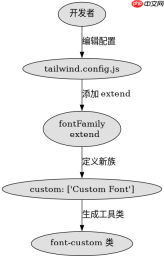
需要在 tailwind.config.js 文件的 theme 对象下扩展 fontFamily 属性。通过添加一个新的键值对,将逻辑上的字体族名称映射到具体的字体文件列表。例如,可以定义一个名为 custom 的字体族,它优先使用 'Custom Font',如果系统没有则回退到 sans-serif。配置完成后,Tailwind会自动生成对应的工具类。
// tailwind.config.js
module.exports = {
  theme: {
    extend: {
      fontFamily: {
        custom: ['"Custom Font"', 'sans-serif'],
      },
    },
  },
  plugins: [],
}
上述代码定义了 font-custom 类。使用时只需在HTML元素上添加 class="font-custom" 即可生效。确保字体文件已正确加载,否则浏览器会使用回退字体。
如何确保自定义字体文件被正确加载并应用?
除了配置Tailwind,还必须在CSS入口文件或HTML中显式加载字体文件。使用 @font-face 规则指定字体源、名称和格式。Tailwind本身不处理字体文件的下载,只负责样式类的生成。因此,必须手动编写 @font-face 或在构建工具中配置字体加载器。

htmlq 是一个命令行工具,使用 CSS 选择器从 HTML 中提取内容,相当于 jq 的 HTML 版本。该工具使用 Rust 编写,允许你通过 CSS 选择器将 HTML 管道化,直接从终端提取文本、属性和结构化内容。
/* styles.css */
@font-face {
  font-family: 'Custom Font';
  src: url('/fonts/custom-font.woff2') format('woff2'),
       url('/fonts/custom-font.woff') format('woff');
  font-weight: normal;
  font-style: normal;
}

@tailwind base;
@tailwind components;
@tailwind utilities;
这段CSS代码确保了 Custom Font 这个名称能指向实际的字体文件。当Tailwind生成的 font-custom 类应用到元素时,浏览器会查找已注册的 Custom Font 并渲染相应字形。若文件路径错误,字体将无法加载,导致回退到默认字体。
如果自定义字体包含多个字重,如何在Tailwind中分别应用?
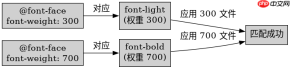
当字体文件包含不同字重(如300, 400, 700)时,需在 @font-face 中明确指定 font-weight,并在Tailwind配置中保持字体族名称一致。Tailwind默认提供 font-light, font-normal, font-bold 等类,它们对应不同的数值。只要 @font-face 中的 font-weight 与这些类匹配,即可自动应用对应字重的字体文件。
/* styles.css */
@font-face {
  font-family: 'Custom Font';
  src: url('/fonts/custom-font-300.woff2') format('woff2');
  font-weight: 300;
  font-style: normal;
}

@font-face {
  font-family: 'Custom Font';
  src: url('/fonts/custom-font-700.woff2') format('woff2');
  font-weight: 700;
  font-style: normal;
}
此时,使用 class="font-custom font-light" 将应用300字重的文件,而 class="font-custom font-bold" 将应用700字重的文件。关键在于 @font-face 的 font-weight 必须与Tailwind工具类所代表的数值严格对应,否则浏览器可能无法正确选择最匹配的字体文件。
前端入门到VUE实战笔记:立即使用
在学习笔记中,你将探索 前端 的入门与实战技巧!