在 apache 中启用 proxy_wstunnel 模块支持 websocket,核心做法是加载该模块并配置反向代理规则。具体操作包括在配置文件中使用 loadmodule 指令引入模块,并在 proxypass 和 proxypassreverse 将特定路径的请求转发至后端 websocket 服务。这样配置后,apache 能够正确识别并处理 websocket 的握手及后续的双向通信。
如何加载 proxy_wstunnel 模块
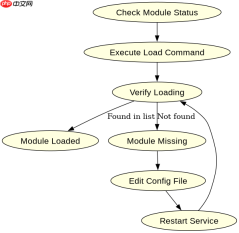
要使用此功能,必须确保 Apache 已加载 mod_proxy_wstunnel。在 Debian/Ubuntu 系统中,通常使用 a2enmod 命令;在 RHEL/CentOS 系统中,则需检查 httpd.conf 或 conf.modules.d/ 目录下的加载语句。加载成功后,Apache 才能解析 WebSocket 相关的代理指令。
# Debian/Ubuntu 系统
sudo a2enmod proxy_wstunnel
sudo systemctl restart apache2

# RHEL/CentOS 系统 (若未默认加载)
# 编辑 /etc/httpd/conf.modules.d/00-proxy.conf
# 确保包含以下行:
LoadModule proxy_wstunnel_module modules/mod_proxy_wstunnel.so
sudo systemctl restart httpd
执行上述命令后,可通过 apache2ctl -M 或 httpd -M 验证模块是否已出现在已加载模块列表中。若列表中包含 proxy_wstunnel_module,则说明加载成功。
如何配置反向代理规则
配置的核心是使用 ProxyPass 指令将前端路径映射到后端 WebSocket 地址。关键语法是在后端 URL 前添加 ws:// 或 wss:// 协议头,并配合 ProxyPassReverse 处理响应头中的重定向。例如,将 /ws 路径代理到本地后端的 8080 端口。

mitmproxy 是一个交互式的、支持 SSL/TLS 的拦截 HTTP 代理,适用于渗透测试人员和软件开发人员。它支持 HTTP/1、HTTP/2、HTTP/3 和 WebSockets,提供控制台、命令行和基于网页的界面来拦截、检查、修改和重放网络流量。

<virtualhost>
    ServerName example.com

    # 启用必要的代理模块
    ProxyRequests Off
    <proxy>
        Require all granted
    </proxy>

    # 配置 WebSocket 代理
    ProxyPass /ws ws://localhost:8080/ws
    ProxyPassReverse /ws ws://localhost:8080/ws

    # 其他 HTTP 请求代理
    ProxyPass / http://localhost:3000/
    ProxyPassReverse / http://localhost:3000/
</virtualhost>
在此配置中,ProxyPass /ws ws://localhost:8080/ws 明确指定了 WebSocket 协议的代理行为。当客户端连接到 ws://example.com/ws 时,Apache 会将其转换为与后端 localhost:8080 的 WebSocket 连接。注意,ProxyPassReverse 同样需要指定 ws:// 以确保响应头中的 Location 字段被正确重写。
WebSocket 连接建立后的数据转发机制
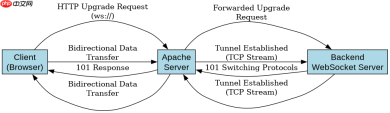
一旦 WebSocket 连接通过 HTTP 升级建立,proxy_wstunnel 模块会将连接切换为隧道模式。此时,Apache 不再解析 HTTP 内容,而是直接双向转发 TCP 数据包。这意味着后续的帧数据(Frame)在客户端和后端之间透明传输,不受 Apache 常规 HTTP 处理逻辑(如缓冲或压缩)的影响。这种机制确保了实时通信的低延迟和高吞吐量。