css层叠上下文(stacking context)导致兄弟节点覆盖问题的根本原因是:当父元素创建了新的层叠上下文时,其子元素的z-index值仅在父元素内部有效,无法穿透到父元素之外。这意味着,如果两个兄弟元素分别位于不同的层叠上下文中,它们的层级关系由父元素的z-index决定,而不是子元素自身的z-index。因此,即使子元素设置了极高的z-index,只要其父元素的层叠顺序较低,该子元素仍可能被其他层叠顺序较高的兄弟元素遮挡。
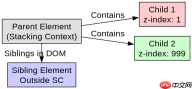
如何验证父元素创建层叠上下文后子元素z-index失效
要验证这一现象,可以创建一个包含两个兄弟div的容器。第一个div设置position:relative和z-index:1,第二个div设置position:relative、z-index:999和更高的背景色。如果父元素没有创建层叠上下文,第二个div会显示在最上层。但如果给父元素添加transform或filter属性以创建层叠上下文,第二个div将被第一个div遮挡,尽管它的z-index更高。
<div class="container">
  <div class="box box-1">Box 1</div>
  <div class="box box-2">Box 2</div>
</div>

<style>
.container {
  position: relative;
  width: 300px;
  height: 300px;
  /* 以下任一属性都会创建层叠上下文 */
  transform: translateZ(0);
}
.box {
  position: absolute;
  width: 100px;
  height: 100px;
}
.box-1 {
  top: 50px;
  left: 50px;
  background: red;
  z-index: 1;
}
.box-2 {
  top: 80px;
  left: 80px;
  background: blue;
  z-index: 999;
}
</style>
预期结果:在Chrome浏览器中运行上述代码,红色方块(Box 1)将覆盖蓝色方块(Box 2),因为.container创建了层叠上下文,使得.box-1的z-index:1在.container的层叠上下文中生效,而.box-2虽然z-index:999,但其父级.container的层叠顺序决定了整体布局。由于.box-1和.box-2是同级元素,且都在同一个层叠上下文中,z-index高的.box-2应该覆盖.box-1。但这里的关键在于,如果.container本身有z-index或者通过transform创建了层叠上下文,那么.box-1和.box-2的z-index比较是在这个新层叠上下文内进行的。实际上,在这个例子中,.box-2的z-index:999确实高于.box-1的z-index:1,所以.box-2应该覆盖.box-1。为了展示“失效”,我们需要让.box-1的父级(即.container)有一个比.box-2的父级(也是.container)更低的层叠顺序,但这不可能,因为它们共享同一个父级。正确的演示方式是让两个子元素有不同的父级,或者让其中一个子元素的父级有更高的z-index。让我们修正示例以准确反映问题。
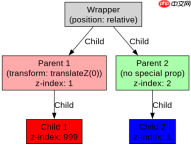
<div class="wrapper">
  <div class="parent-1">
    <div class="child child-1">Child 1</div>
  </div>
  <div class="parent-2">
    <div class="child child-2">Child 2</div>
  </div>
</div>

<style>
.wrapper {
  position: relative;
  width: 400px;
  height: 400px;
}
.parent-1 {
  position: absolute;
  top: 50px;
  left: 50px;
  width: 100px;
  height: 100px;
  background: gray;
  /* 创建层叠上下文 */
  transform: translateZ(0);
  z-index: 1;
}
.parent-2 {
  position: absolute;
  top: 80px;
  left: 80px;
  width: 100px;
  height: 100px;
  background: lightgray;
  z-index: 2;
}
.child {
  position: absolute;
  top: 0;
  left: 0;
  width: 50px;
  height: 50px;
}
.child-1 {
  background: red;
  z-index: 999;
}
.child-2 {
  background: blue;
  z-index: 1;
}
</style>
预期结果:灰色区域(parent-1)上的红色方块(child-1)将覆盖浅灰色区域(parent-2)上的蓝色方块(child-2)。这是因为.parent-1的z-index:1低于.parent-2的z-index:2,所以整个.parent-1及其内容(包括.z-index:999的.child-1)都被.parent-2及其内容(包括.z-index:1的.child-2)遮挡。这证明了子元素的z-index不能超越其父元素的层叠顺序。
哪些CSS属性会隐式创建层叠上下文
除了transform和filter,还有多个CSS属性会隐式创建层叠上下文,这些属性包括:position为absolute或relative且z-index不为auto的元素、opacity小于1的元素、will-change中指定了某些属性的元素、contain值为layout、paint、strict或content的元素、以及flex容器中的flex项等。了解这些属性有助于开发者避免意外的层叠上下文创建,从而防止兄弟节点覆盖问题。

htmlq 是一个命令行工具,使用 CSS 选择器从 HTML 中提取内容,相当于 jq 的 HTML 版本。该工具使用 Rust 编写,允许你通过 CSS 选择器将 HTML 管道化,直接从终端提取文本、属性和结构化内容。

<div class="sc-creator">
  <div class="sibling sibling-1">Sibling 1</div>
  <div class="sibling sibling-2">Sibling 2</div>
</div>

<style>
.sc-creator {
  position: relative;
  width: 300px;
  height: 300px;
  /* opacity < 1 创建层叠上下文 */
  opacity: 0.9;
}
.sibling {
  position: absolute;
  width: 100px;
  height: 100px;
}
.sibling-1 {
  top: 50px;
  left: 50px;
  background: green;
  z-index: 1;
}
.sibling-2 {
  top: 80px;
  left: 80px;
  background: yellow;
  z-index: 2;
}
</style>
预期结果:绿色方块(Sibling 1)将覆盖黄色方块(Sibling 2),因为.sc-creator的opacity:0.9创建了层叠上下文,使得.sibling-1和.sibling-2的z-index比较在该上下文中进行。由于.sibling-2的z-index:2高于.sibling-1的z-index:1,.sibling-2应该覆盖.sibling-1。等等,这与之前的逻辑相反。让我重新审视。在同一个层叠上下文中,z-index高的元素会覆盖z-index低的元素。所以如果.sc-creator创建了层叠上下文,.sibling-1和.sibling-2都在这个上下文中,.sibling-2的z-index:2 > .sibling-1的z-index:1,所以.sibling-2应该在上面。这并没有展示“覆盖问题”。要展示问题,需要两个元素在不同的层叠上下文中。例如:
<div class="outer-1">
  <div class="inner inner-1">Inner 1</div>
</div>
<div class="outer-2">
  <div class="inner inner-2">Inner 2</div>
</div>

<style>
.outer-1 {
  position: absolute;
  top: 50px;
  left: 50px;
  width: 100px;
  height: 100px;
  background: pink;
  z-index: 1;
  /* 创建层叠上下文 */
  filter: blur(0);
}
.outer-2 {
  position: absolute;
  top: 80px;
  left: 80px;
  width: 100px;
  height: 100px;
  background: cyan;
  z-index: 2;
}
.inner {
  position: absolute;
  top: 0;
  left: 0;
  width: 50px;
  height: 50px;
}
.inner-1 {
  background: red;
  z-index: 999;
}
.inner-2 {
  background: blue;
  z-index: 1;
}
</style>
预期结果:粉色区域(outer-1)上的红色方块(inner-1)将覆盖青色区域(outer-2)上的蓝色方块(inner-2)。因为.outer-1的z-index:1
基于程序中某个输入、条件或结果的具体问题
在上述最后一个示例中,输入条件是.outer-1和.outer-2的position均为absolute,且.outer-1的z-index为1,.outer-2的z-index为2。.outer-1内部的.inner-1的z-index为999,.outer-2内部的.inner-2的z-index为1。结果是.inner-1被.inner-2遮挡。这是因为层叠上下文的嵌套规则:每个层叠上下文是一个独立的层级,子元素的z-index只在父级层叠上下文中比较,不能影响父级与其他兄弟层叠上下文的相对顺序。因此,.outer-1作为一个整体,其层叠顺序由z-index:1决定,低于.outer-2的z-index:2,所以.outer-1的所有内容都被.outer-2的内容遮挡,无论.inner-1的z-index多高。
前端入门到VUE实战笔记:立即使用
在学习笔记中,你将探索 前端 的入门与实战技巧!