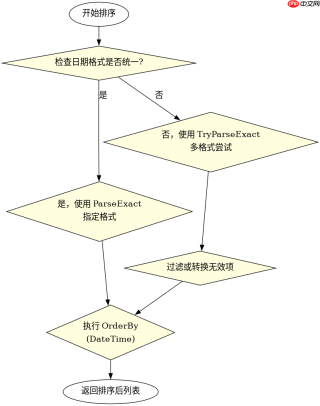
使用 orderby 配合 datetime.parseexact 将字符串解析为 datetime 对象后再排序。直接对日期字符串排序会按字典序进行,导致 "2023-10-01" 排在 "2023-09-12" 之后(因为 '1' > '9'),而实际时间顺序是前者在后。通过显式指定格式字符串解析,可以确保比较的是真实的时间值。

为什么直接排序会出错?
直接调用 OrderBy(x => x) 或 Sort() 时,List 中的元素被视为文本。文本比较遵循字符编码顺序,即逐个字符比较 ASCII 码。对于 "yyyy-MM-dd" 格式的日期,如果月份或日期是个位数且未补零(如 "2023-5-1"),或者年份不同但前缀相似,字典序就会完全偏离时间序。即使格式固定为 "yyyy-MM-dd",若存在跨世纪或不同年份的混合数据,字典序依然可靠,但在处理非标准格式或包含时间的字符串时,字典序极易出错。
using System;
using System.Collections.Generic;
using System.Linq;

class Program
{
    static void Main()
    {
        List<string> dates = new List<string>
        {
            "2023-10-01",
            "2023-09-12",
            "2024-01-05"
        };

        // 错误做法:按字符串字典序排序
        var sortedByString = dates.OrderBy(d => d).ToList();
        Console.WriteLine("String Sort: " + string.Join(", ", sortedByString));

        // 正确做法:按 DateTime 解析后排序
        var sortedByDate = dates.OrderBy(d => DateTime.ParseExact(d, "yyyy-MM-dd", null)).ToList();
        Console.WriteLine("Date Sort: " + string.Join(", ", sortedByDate));
    }
}
</string></string>
如何处理非标准或带时间的日期字符串?
当日期字符串包含时间部分(如 "yyyy-MM-dd HH:mm:ss")或非标准分隔符时,需调整 ParseExact 的格式参数。若格式不固定,可使用 DateTime.TryParseExact 尝试多种格式,或使用 DateTime.Parse 依赖系统区域设置(不推荐用于生产环境,因行为不可控)。最佳实践是定义明确的格式数组,依次尝试解析,确保鲁棒性。


using System;
using System.Collections.Generic;
using System.Linq;

class Program
{
    static void Main()
    {
        List<string> mixedDates = new List<string>
        {
            "2023-10-01 14:30:00",
            "2023-09-12 09:15:30",
            "2024-01-05 18:45:00"
        };

        string[] formats = { "yyyy-MM-dd HH:mm:ss", "yyyy/MM/dd HH:mm:ss" };
        var sortedWithTime = mixedDates
            .OrderBy(d => DateTime.ParseExact(d, formats, null, System.Globalization.DateTimeStyles.None))
            .ToList();

        Console.WriteLine("Sorted with Time: " + string.Join(", ", sortedWithTime));
    }
}
</string></string>
基于程序中某个输入、条件或结果的具体问题
当输入列表中包含无法解析的日期字符串(如空字符串或非法格式)时,ParseExact 会抛出 FormatException。为避免程序崩溃,应在排序前过滤或转换无效数据。例如,使用 TryParseExact 将无效项映射为 DateTime.MinValue 或跳过它们,确保排序操作在干净的数据集上执行。