






php 8.6命令行任务可用hrtime记录单调时间差,用getrusage计算进程用户态和内核态cpu增量,再单独记录php分配器的峰值。墙钟耗时包含等待,cpu时间和内存峰值具有不同口径,不能混成一个性能数字。
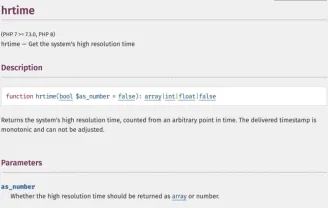
PHP手册中的hrtime
给已有任务加一层测量包装
<?php function cpuSeconds(array $r,string $kind): float {
    return (float)($r['ru_'.$kind.'.tv_sec']??0)
        +(float)($r['ru_'.$kind.'.tv_usec']??0)/1000000;
}
function measured(callable $job): mixed {
    if (PHP_SAPI!=='cli' || PHP_INT_SIZE<8) {
        throw new RuntimeException('示例要求64位CLI');
    }
    $before=getrusage();
    if ($before===false) throw new RuntimeException('无法读取进程指标');
    memory_reset_peak_usage(); $start=hrtime(true);
    try { return $job(); }
    finally {
        $after=getrusage();
        $metrics=['elapsed_ms'=>(hrtime(true)-$start)/1e6,
            'php_peak_bytes'=>memory_get_peak_usage(true)];
        if ($after!==false) {
            $metrics['user_cpu_seconds']=cpuSeconds($after,'utime')-cpuSeconds($before,'utime');
            $metrics['system_cpu_seconds']=cpuSeconds($after,'stime')-cpuSeconds($before,'stime');
        }
        fwrite(STDERR,json_encode($metrics,JSON_THROW_ON_ERROR).PHP_EOL);
    }
}
$sum=measured(function(): int {
    $total=0;
    for ($i=1;$i<p style="text-align:center">@@##@@</p><p style="text-align:center">PHP手册中的getrusage</p><h2>保持业务输出和指标分开</h2><p>示例把指标写入标准错误,业务结果仍走标准输出;将包装器中的演示循环换成实际任务时,不要把原始业务数据放进指标日志。finally确保任务抛异常时也会记录已经消耗的资源。</p><h2>不要把一次结果当作优化结论</h2><p>getrusage默认统计当前进程,不包含所有外部服务,也不自动汇总仍在运行的子进程。memory_get_peak_usage(true)报告PHP分配器口径,不等于整个进程RSS。不同系统的ru_maxrss单位可能不同,本例没有把它直接标为字节;比较优化前后应固定输入与环境并重复测量。</p><div class="aritcle_card flexRow artxards">
											<div class="artcardd flexRow">
												<a class="aritcle_card_img" rel="nofollow" href="/xiazai/skill13222" title="Build MCP servers and clients for PHP applications with the official PHP SDK"><img
														src="https://img.php.cn/upload/skill/001/246/273/6adaf20e352aa140.jpg" alt="Build MCP servers and clients for PHP applications with the official PHP SDK" onerror="this.onerror='';this.src='/static/lhimages/moren/morentu.png'" ></a>
												<div class="aritcle_card_info flexColumn">
													<a rel="nofollow" href="/xiazai/skill13222" title="Build MCP servers and clients for PHP applications with the official PHP SDK" class="overflowclass">Build MCP servers and clients for PHP applications with the official PHP SDK</a>
													<p class="overflowclass">使用官方Model Context Protocol PHP SDK将PHP应用程序功能暴露为MCP工具、资源和提示,用于代理工作流。</p>
												</div>
												<a rel="nofollow" href="/xiazai/skill13222" title="Build MCP servers and clients for PHP applications with the official PHP SDK" class="aritcle_card_btn flexRow flexcenter"><b></b><span>下载</span>
												</a>
											</div>
										</div>

php免费学习视频:立即使用
踏上前端学习之旅,开启通往精通之路!从前端基础到项目实战,循序渐进,一步一个脚印,迈向巅峰!






