






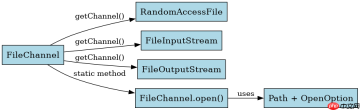
java nio 中打开 filechannel 不能直接通过构造函数实例化,必须借助 randomaccessfile、fileinputstream 或 fileoutputstream 的 getchannel() 方法获取。具体做法是创建对应的流对象并指定访问模式(如只读、读写),随后调用 getchannel() 即可得到可用的通道实例。若使用 filechannel.open() 静态方法,则需传入 path 和 openoption 参数来明确权限与行为。
RandomAccessFile 模式下如何控制读写权限
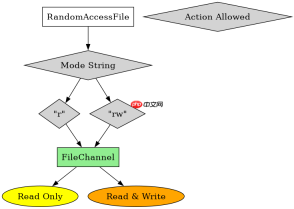
通过 RandomAccessFile 打开 FileChannel 时,权限由构造函数的第二个字符串参数决定。传入 "r" 表示只读,此时获取的通道仅允许读取操作;传入 "rw" 表示读写,允许进行读取和写入。这种方式的优点是简单直观,且支持随机访问文件指针的移动。需要注意的是,如果文件不存在且模式为 "rw",会自动创建新文件;若存在但被设为只读模式,尝试写入会抛出异常。
import java.io.RandomAccessFile;
import java.nio.channels.FileChannel;

public class Demo {
    public static void main(String[] args) throws Exception {
        // 以读写模式打开文件
        RandomAccessFile raf = new RandomAccessFile("test.txt", "rw");
        FileChannel channel = raf.getChannel();

        // 验证通道是否可写
        System.out.println("Channel is open: " + channel.isOpen());

        raf.close();
    }
}
上述代码创建了 test.txt 文件的读写通道。运行后控制台输出 Channel is open: true。若将模式改为 "r",则调用 channel.write() 将抛出 NonWritableChannelException。这体现了 RandomAccessFile 对通道权限的直接控制。
FileChannel.open() 如何使用 OpenOption 配置
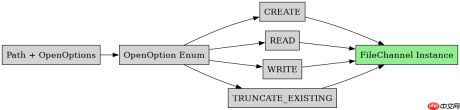
FileChannel.open() 是 Java 7 引入的更现代的方式,它接受 java.nio.file.Path 和一组 OpenOption 枚举值。常用选项包括 StandardOpenOption.READ、StandardOpenOption.WRITE、StandardOpenOption.CREATE 等。这种方式提供了更细粒度的控制,例如可以同时指定 CREATE 和 TRUNCATE_EXISTING 来清空并写入文件。与 RandomAccessFile 不同,FileChannel.open() 不依赖流对象,直接基于路径操作,更适合 NIO.2 的文件处理场景。

使用 Husky 将 pre-commit、pre-push 和 commit-msg 检查集成到仓库中,以便代理和开发人员在更改离开工作站之前运行相同的本地防护措施。
import java.nio.channels.FileChannel;
import java.nio.file.StandardOpenOption;
import java.nio.file.Path;
import java.nio.file.Paths;

public class Demo2 {
    public static void main(String[] args) throws Exception {
        Path path = Paths.get("test2.txt");
        // 创建文件,允许读写,若存在则追加
        FileChannel channel = FileChannel.open(path,
            StandardOpenOption.CREATE,
            StandardOpenOption.READ,
            StandardOpenOption.WRITE);

        System.out.println("Opened via FileChannel.open");
        channel.close();
    }
}
该程序使用 FileChannel.open() 打开 test2.txt,并组合了 CREATE、READ 和 WRITE 选项。运行后文件会被创建(若不存在)或保留(若已存在),且通道处于可读可写状态。输出为 Opened via FileChannel.open。相比 RandomAccessFile,这种方式更灵活,适合需要复杂打开策略的场景。
关闭通道时是否需要先关闭关联的流?
当通过 RandomAccessFile 或 FileInputStream/FileOutputStream 获取 FileChannel 后,关闭通道或关闭流都会影响对方的状态。根据 Java 文档,关闭底层的流会导致通道失效,反之亦然。因此,通常只需关闭其中一个即可,但为了资源管理的清晰性,建议显式关闭最外层的资源。在 try-with-resources 结构中,关闭 RandomAccessFile 会自动关闭其内部的通道和文件描述符。
import java.io.RandomAccessFile;
import java.nio.channels.FileChannel;

public class Demo3 {
    public static void main(String[] args) throws Exception {
        try (RandomAccessFile raf = new RandomAccessFile("test.txt", "r");
             FileChannel channel = raf.getChannel()) {
            // 使用通道
            System.out.println("Using channel in try-with-resources");
        } // 自动关闭 raf,进而关闭 channel
    }
}
此示例展示了在 try-with-resources 中同时声明 RandomAccessFile 和 FileChannel。虽然 channel 依赖于 raf,但分别声明可以确保两者都被正确关闭。运行时输出 Using channel in try-with-resources,之后资源被释放。若只关闭 channel,raf 仍可能持有文件句柄,导致潜在的资源泄漏,因此推荐优先关闭流对象。
Java免费学习笔记:立即使用
解锁 Java 大师之旅:从入门到精通的终极指南


