






在 javascript 中模拟 navigator 属性,最可靠的方法是使用 object.defineproperty() 对全局对象(如 window)进行属性重定义。通过设置 configurable: true 和 value,可以覆盖浏览器原生提供的只读属性,使其返回你指定的自定义对象或字符串值。

如何模拟 navigator.userAgent 属性
要模拟 userAgent,需要获取当前 window.navigator 的原始配置状态,确保其可被重新定义,然后使用 Object.defineProperty 将其 value 修改为包含目标 userAgent 字符串的对象。这样做会直接改变后续代码读取该属性时的返回值,常用于测试特定浏览器的行为。
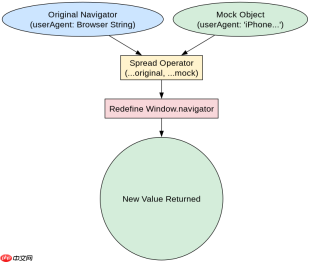
const originalNavigator = window.navigator;
const mockUserAgent = "Mozilla/5.0 (iPhone; CPU iPhone OS 13_2 like Mac OS X)";

// 检查是否可配置,防止报错
if (Object.getOwnPropertyDescriptor(window, 'navigator').configurable) {
  Object.defineProperty(window, 'navigator', {
    value: {
      ...originalNavigator,
      userAgent: mockUserAgent
    },
    writable: true,
    configurable: true
  });
}

console.log(navigator.userAgent); // 输出模拟的 UA 字符串
运行上述代码后,控制台将打印出设定的 iPhone 用户代理字符串。这验证了 userAgent 已被成功劫持。注意,这种模拟是全局生效的,会影响同一作用域下的所有依赖 navigator 的代码。
如何模拟 navigator.geolocation 接口
模拟地理位置接口通常用于前端单元测试,避免触发真实的定位请求。实现方式是构造一个符合 Geolocation API 规范的假对象,包含 getCurrentPosition 和 watchPosition 方法,这些方法内部直接调用回调函数并返回固定数据,从而绕过网络请求。

FilePond 是一个 JavaScript 文件上传库,支持通过拖拽、粘贴和 API 方式处理文件、目录、URL 和 Data URI。它包含内置的图像优化功能、异步分块上传功能,并提供了适用于 React、Vue、Angular 和 Svelte 的适配器。

const mockGeolocation = {
  getCurrentPosition: function(successCallback, errorCallback) {
    const mockCoords = {
      latitude: 40.7128,
      longitude: -74.0060,
      accuracy: 100
    };
    successCallback({ coords: mockCoords });
  },
  watchPosition: function() { return 0; },
  clearWatch: function() {}
};

Object.defineProperty(window, 'navigator', {
  value: {
    ...window.navigator,
    geolocation: mockGeolocation
  },
  writable: true,
  configurable: true
});

navigator.geolocation.getCurrentPosition((pos) => {
  console.log(pos.coords.latitude); // 输出 40.7128
});
执行这段代码时,getCurrentPosition 会立即同步调用成功回调,并传入预设的纽约坐标。开发者可以通过这种方式在 CI/CD 环境或 Jest 测试中完全控制地理数据的返回,无需真实设备支持。
模拟后如何恢复原始 navigator 状态
在进行属性重定义前保存原始引用是最佳实践。当测试结束或功能模块卸载时,必须将 window.navigator 恢复至初始状态,否则可能导致应用其他部分出现不可预知的错误。恢复操作同样依赖于 Object.defineProperty,只需将 value 设回最初捕获的 originalNavigator 即可。
function restoreNavigator() {
  if (Object.getOwnPropertyDescriptor(window, 'navigator').configurable) {
    Object.defineProperty(window, 'navigator', {
      value: originalNavigator,
      writable: true,
      configurable: true
    });
  }
}

restoreNavigator();
console.log(navigator.userAgent); // 恢复为浏览器真实的 UA
调用恢复函数后,再次读取 userAgent 将返回浏览器原本的真实标识。这种“保存-修改-恢复”的模式确保了 Mock 操作的隔离性,防止副作用污染全局环境。在实际工程中,建议将此逻辑封装在测试框架的 beforeEach 和 afterEach 钩子中自动执行。
Java免费学习笔记:立即使用
解锁 Java 大师之旅:从入门到精通的终极指南





