






java nio 中的 channel 是连接数据源(如文件、网络套接字)的通道,用于高效地传输数据。开发者通常使用 bytebuffer 将数据写入或从 channel 中读取,从而实现非阻塞 i/o 操作。与传统的流不同,channel 支持双向读写,并且可以配合 selector 实现多路复用。
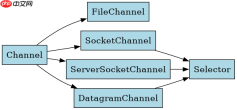
Channel 的核心类型有哪些
Java NIO 提供了多种具体的 Channel 实现,主要涵盖文件和网络两种场景。常用的包括 FileChannel 用于文件读写,SocketChannel 和 ServerSocketChannel 用于 TCP 通信,以及 DatagramChannel 用于 UDP 通信。这些类都继承自抽象基类 Channel,但只有部分支持非阻塞模式。
import java.io.FileInputStream; import java.nio.ByteBuffer; import java.nio.channels.FileChannel; public class FileChannelDemo { public static void main(String[] args) throws Exception { FileInputStream fis = new FileInputStream("test.txt"); FileChannel channel = fis.getChannel(); ByteBuffer buffer = ByteBuffer.allocate(48); int bytesRead = channel.read(buffer); System.out.println("Read bytes: " + bytesRead); fis.close(); } }
Channel 与 Buffer 如何交互
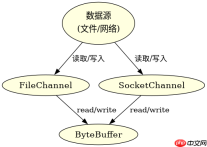
Channel 本身不存储数据,所有数据必须通过 Buffer 进行中转。在读取时,数据从 Channel 流入 Buffer;在写入时,数据从 Buffer 流出到 Channel。这种设计使得内存管理与 I/O 操作解耦,提高了灵活性。开发者需要手动管理 Buffer 的 flip() 和 clear() 状态以确保数据正确传输。

FilePond 是一个 JavaScript 文件上传库,支持通过拖拽、粘贴和 API 方式处理文件、目录、URL 和 Data URI。它包含内置的图像优化功能、异步分块上传功能,并提供了适用于 React、Vue、Angular 和 Svelte 的适配器。

import java.net.InetSocketAddress; import java.nio.ByteBuffer; import java.nio.channels.SocketChannel; public class SocketChannelDemo { public static void main(String[] args) throws Exception { SocketChannel channel = SocketChannel.open(); channel.connect(new InetSocketAddress("localhost", 8080)); String newData = "New String to write to file..."; ByteBuffer buffer = ByteBuffer.allocate(48); buffer.put(newData.getBytes()); buffer.flip(); while (buffer.hasRemaining()) { channel.write(buffer); } channel.close(); } }
Channel 在非阻塞模式下如何处理空读
当 Channel 设置为非阻塞模式时,如果当前没有数据可读,read() 方法会立即返回 0 而不是阻塞等待。这意味着开发者必须在循环中检查返回值,并在返回 0 时执行其他任务或稍后重试,以避免 CPU 空转。这是构建高性能 NIO 服务器的关键逻辑之一。
Java免费学习笔记:立即使用
解锁 Java 大师之旅:从入门到精通的终极指南


