






在 javascript 中,通过 fetch() 设置请求凭证(如 cookie)需要配置 credentials 选项。默认情况下,跨域请求不会发送凭证,因此必须显式将 credentials 设置为 'include' 才能携带凭证。

不同 credentials 值的行为差异是什么
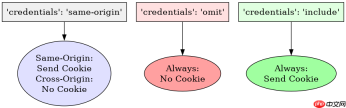
credentials 属性支持三种模式:'same-origin'、'omit' 和 'include'。'same-origin' 是默认值,仅同源请求会发送凭证;'omit' 强制不发送任何凭证;'include' 允许跨域请求也发送凭证。
const url = 'https://api.example.com/data';

// 默认行为:同源发送,跨域不发送
fetch(url).then(r => r.json());

// 强制跨域发送凭证
fetch(url, { credentials: 'include' }).then(r => r.json());

// 强制不发送凭证
fetch(url, { credentials: 'omit' }).then(r => r.json());
当使用 'include' 时,服务器必须配合设置 Access-Control-Allow-Credentials: true 响应头,否则浏览器会拦截响应。
如何验证凭证是否成功发送
可以通过检查网络面板或后端日志来验证凭证是否随请求发送。前端代码中无法直接读取 Set-Cookie 响应头,但可以通过观察后续请求是否携带 Cookie 来间接验证。

FilePond 是一个 JavaScript 文件上传库,支持通过拖拽、粘贴和 API 方式处理文件、目录、URL 和 Data URI。它包含内置的图像优化功能、异步分块上传功能,并提供了适用于 React、Vue、Angular 和 Svelte 的适配器。

// 模拟跨域请求并检查响应状态
fetch('https://api.example.com/protected', {
  credentials: 'include'
}).then(response => {
  if (response.ok) {
    console.log('凭证已发送且请求成功');
  } else {
    console.error('凭证发送失败或服务器拒绝');
  }
});
如果服务器未正确配置 CORS 策略,即使设置了 credentials: 'include',浏览器仍会阻止响应返回给前端。
credentials 为 include 时服务器需如何配置
当客户端使用 credentials: 'include' 发起跨域请求时,服务器必须在响应中包含 Access-Control-Allow-Credentials: true 头。同时,Access-Control-Allow-Origin 不能设置为通配符 *,必须明确指定允许的源。
// Node.js Express 示例
app.use((req, res, next) => {
  res.header('Access-Control-Allow-Origin', 'https://example.com');
  res.header('Access-Control-Allow-Credentials', 'true');
  res.header('Access-Control-Allow-Methods', 'GET, POST');
  res.header('Access-Control-Allow-Headers', 'Content-Type');
  next();
});
若服务器错误地使用了 Access-Control-Allow-Origin: *,浏览器将拒绝接受包含凭证的响应,导致前端收到空响应或错误。
大量免费API接口:立即使用
涵盖生活服务API、金融科技API、企业工商API、等相关的API接口服务。免费API接口可安全、合规地连接上下游,为数据API应用能力赋能!





