使用 streamreader 的 readline() 方法逐行读取文件,避免一次性加载长文本到内存。这种方式按行缓冲读取,每次只处理一行数据,从而显著降低内存占用。
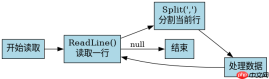
StreamReader 如何逐行读取并分割文本?
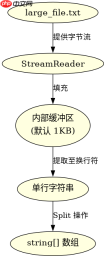
StreamReader.ReadLine() 会返回当前行字符串,遇到换行符时自动截断。配合 string.Split() 可以立即对单行进行分割处理,无需等待整个文件读完。这种方法适合处理超大日志文件或 CSV 数据。
using System;
using System.IO;

class Program
{
    static void Main()
    {
        string filePath = "large_file.txt";
        using (var reader = new StreamReader(filePath))
        {
            string line;
            while ((line = reader.ReadLine()) != null)
            {
                // 假设每行用逗号分隔
                string[] parts = line.Split(',');
                Console.WriteLine($"First part: {parts[0]}");
            }
        }
    }
}
预期结果:程序不会抛出 OutOfMemoryException,且能稳定处理 GB 级文件。每行输出其第一个分割字段。
如何处理编码和缓冲区大小?
StreamReader 构造函数允许指定编码(如 UTF-8)和缓冲区大小(默认 1024 字节)。对于非 ASCII 字符或需要更高 I/O 性能的场景,显式设置这些参数可避免隐式转换开销或频繁的系统调用。


using System;
using System.IO;
using System.Text;

class Program
{
    static void Main()
    {
        string filePath = "utf8_large_file.txt";
        // 指定 UTF-8 编码和 4KB 缓冲区
        using (var reader = new StreamReader(filePath, Encoding.UTF8, true, 4096))
        {
            string line;
            while ((line = reader.ReadLine()) != null)
            {
                if (line.Contains("ERROR"))
                {
                    Console.WriteLine(line);
                }
            }
        }
    }
}
预期结果:正确解析包含中文或特殊符号的行,且 I/O 效率优于默认缓冲区。若文件损坏或非 UTF-8 格式,可能抛出 DecoderFallbackException。
当某行包含多个分隔符时,Split 行为如何?
如果单行内存在连续分隔符(如 ,,),string.Split() 默认会生成空字符串元素。可通过传入 StringSplitOptions.RemoveEmptyEntries 来过滤这些空项,确保数组长度符合预期。这在处理不规范 CSV 数据时尤为关键。