






javascript fetch api 原生不支持请求进度监听,必须通过包装 xmlhttprequest 对象来实现。具体做法是创建一个 xmlhttprequest 实例,配置其属性并绑定 progress 事件回调,然后在回调中计算下载进度百分比,最后将数据流转换为 readablestream 以模拟 fetch 的行为。

如何获取上传进度信息
针对上传场景,可以通过监听 XMLHttpRequest 的 upload 对象的 progress 事件来获取进度。该事件会持续触发,提供已发送字节数和总字节数,从而计算出上传进度。
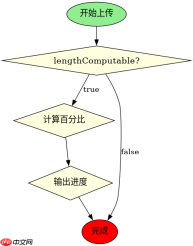
function uploadWithProgress(url, data) {
    return new Promise((resolve, reject) => {
        const xhr = new XMLHttpRequest();
        xhr.open('POST', url);

        // 监听上传进度
        xhr.upload.onprogress = (event) => {
            if (event.lengthComputable) {
                const percent = (event.loaded / event.total) * 100;
                console.log(`Upload Progress: ${percent.toFixed(2)}%`);
            }
        };

        xhr.onload = () => {
            if (xhr.status >= 200 && xhr.status  reject(new Error('Network Error'));
        xhr.send(data);
    });
}
如何获取下载进度信息
针对下载场景,需要监听 XMLHttpRequest 实例本身的 progress 事件。由于 Fetch 返回的是流,这里我们通过 responseType = 'arraybuffer' 接收数据,并在 progress 事件中处理流式响应,最终构建一个可读流来模拟 Fetch 的返回值。

FilePond 是一个 JavaScript 文件上传库,支持通过拖拽、粘贴和 API 方式处理文件、目录、URL 和 Data URI。它包含内置的图像优化功能、异步分块上传功能,并提供了适用于 React、Vue、Angular 和 Svelte 的适配器。

function fetchWithProgress(url, onProgress) {
    return new Promise((resolve, reject) => {
        const xhr = new XMLHttpRequest();
        xhr.open('GET', url);
        xhr.responseType = 'arraybuffer';

        xhr.onprogress = (event) => {
            if (event.lengthComputable && onProgress) {
                const percent = (event.loaded / event.total) * 100;
                onProgress(percent);
            }
        };

        xhr.onload = () => {
            if (xhr.status >= 200 && xhr.status  reject(new Error('Network Error'));
        xhr.send();
    });
}

// 使用示例
fetchWithProgress('https://example.com/large-file.bin', (percent) => {
    console.log(`Download Progress: ${percent.toFixed(2)}%`);
}).then(stream => {
    console.log('Download complete');
});
当服务器未发送 Content-Length 时进度显示什么
如果服务器响应头中缺少 Content-Length,XMLHttpRequest 的 progress 事件中 lengthComputable 属性将为 false。此时无法计算百分比进度,只能依赖 loaded 字段的绝对值变化来判断数据传输状态。
大量免费API接口:立即使用
涵盖生活服务API、金融科技API、企业工商API、等相关的API接口服务。免费API接口可安全、合规地连接上下游,为数据API应用能力赋能!





