






在 javascript 的 async 函数中,箭头函数的使用方式与普通函数完全一致,核心区别在于 this 的绑定机制和语法简洁性。你可以直接使用 const fn = async () => { ... } 定义异步逻辑,或者将箭头函数作为参数传递给 .then()、promise.all() 等方法。由于箭头函数没有自己的 this,它在 async 上下文中能更稳定地捕获外层作用域的上下文,避免了传统函数中常见的 this 指向丢失问题。

如何定义和使用独立的 async 箭头函数
定义一个独立的 async 箭头函数只需在箭头前加上 async 关键字。这种写法常用于封装网络请求或文件读取等异步操作。调用时直接像普通函数一样执行,它会返回一个 Promise 对象。若需获取结果,必须配合 await 或在链式调用中使用 .then()。
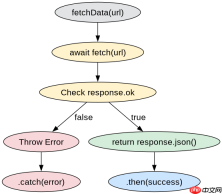
const fetchData = async (url) => {
  const response = await fetch(url);
  if (!response.ok) {
    throw new Error(`HTTP error! status: ${response.status}`);
  }
  return await response.json();
};

// 调用示例
fetchData('https://api.example.com/data')
  .then(data => console.log('Success:', data))
  .catch(err => console.error('Failed:', err));
在 Promise 链式调用中如何使用 async 箭头函数
当处理多个异步任务或进行链式操作时,常将 async 箭头函数作为回调传入 .then() 或 Promise.all()。这种方式允许你在回调内部使用 await,从而以同步风格编写异步代码,避免深层嵌套。需要注意的是,如果直接在 .then() 中使用非 async 的箭头函数,内部的 await 将无效,因为该回调本身不返回 Promise。

FilePond 是一个 JavaScript 文件上传库,支持通过拖拽、粘贴和 API 方式处理文件、目录、URL 和 Data URI。它包含内置的图像优化功能、异步分块上传功能,并提供了适用于 React、Vue、Angular 和 Svelte 的适配器。

const processUser = async (userId) => {
  const user = await getUser(userId);
  const posts = await getPosts(user.id);
  return { user, posts };
};

Promise.all([
  processUser(1),
  processUser(2)
]).then(results => {
  console.log('All users processed:', results);
});
async 箭头函数中的 this 绑定行为是什么
在 async 箭头函数中,this 始终继承自定义时的外层作用域,而不是调用时的上下文。这意味着在类方法或对象方法中使用 async 箭头函数时,无需担心 this 丢失。相比之下,如果使用传统的 async 方法声明(如 async methodName() {}),this 会动态绑定到调用者。因此,在需要保持上下文一致性的场景下,async 箭头函数是更安全的选择。
,
Java免费学习笔记:立即使用
解锁 Java 大师之旅:从入门到精通的终极指南





