在 linux 中,nginx 动态控制不同业务接口缓存有效期的核心做法是结合 $arg_* 变量与 expires 指令。通过在 nginx 配置文件中定义一个包含条件判断的 map 块,将请求中的特定参数(如 v)映射为不同的缓存时间字符串,然后在 location 块中引用该变量即可实现。
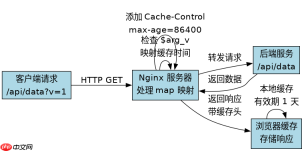
如何根据 URL 参数设置基础缓存策略
直接回答:通过 map 指令解析 URL 查询参数并映射到 Cache-Control 或 expires 的值,可以在不重启 Nginx 的情况下动态调整缓存。
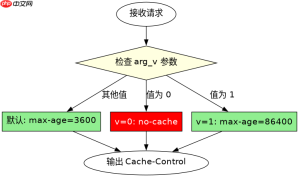
http {
    # 定义变量 $cache_control
    map $arg_v $cache_control {
        default "max-age=3600";       # 默认缓存 1 小时
        "0"     "no-cache, no-store"; # v=0 时禁用缓存
        "1"     "max-age=86400";      # v=1 时缓存 1 天
    }

    server {
        listen 80;
        server_name example.com;

        location /api/ {
            proxy_pass http://backend;

            # 应用动态缓存头
            add_header Cache-Control $cache_control always;

            # 可选:针对静态资源使用 expires
            # expires $cache_control;
        }
    }
}
预期结果:访问 /api/data?v=0 返回 no-cache, no-store;访问 /api/data?v=1 返回 max-age=86400;其他情况返回 max-age=3600。
如何针对不同 URI 路径差异化控制缓存
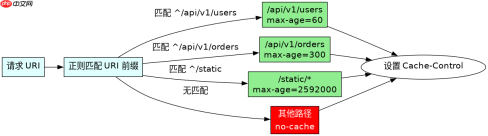
直接回答:利用 map 对 $request_uri 进行正则匹配,可以为不同的业务接口路径绑定独立的缓存有效期变量,从而实现细粒度的动态控制。

http {
    # 定义变量 $uri_cache_time
    map $request_uri $uri_cache_time {
        ~^/api/v1/users   "max-age=60";    # 用户列表缓存 1 分钟
        ~^/api/v1/orders  "max-age=300";   # 订单列表缓存 5 分钟
        ~^/static         "max-age=2592000"; # 静态资源缓存 30 天
        default             "no-cache";      # 其他默认不缓存
    }

    server {
        listen 80;
        server_name example.com;

        location / {
            proxy_pass http://backend;

            # 应用基于路径的动态缓存
            add_header Cache-Control $uri_cache_time always;
        }
    }
}
预期结果:请求 /api/v1/users 获得 max-age=60;请求 /api/v1/orders 获得 max-age=300;请求 /static/logo.png 获得 max-age=2592000。
当同时存在参数控制和路径控制时,哪个优先级更高
直接回答:Nginx 的配置执行顺序决定了最终生效的缓存头。如果在同一个 location 中同时使用了基于参数的 map 和基于路径的 map,后执行的 add_header 会覆盖先执行的,或者可以通过逻辑组合来决定最终值。通常建议在一个 map 中综合判断,或通过 if 语句明确优先级。
http {
    map $arg_v $param_cache {
        default "default";
        "0"     "no-cache";
    }

    map $request_uri $path_cache {
        ~^/api/sensitive  "no-store";
        default           "default";
    }

    server {
        listen 80;
        server_name example.com;

        location /api/ {
            proxy_pass http://backend;

            # 逻辑:如果路径敏感,强制 no-store;否则看参数
            if ($path_cache = "no-store") {
                add_header Cache-Control "no-store" always;
            } else {
                add_header Cache-Control $param_cache always;
            }
        }
    }
}
预期结果:对于 /api/sensitive?key=val,即使参数未指定禁用,路径规则优先返回 no-store;对于 /api/public?v=0,路径非敏感,参数规则生效,返回 no-cache。