






要让php接口返回文件下载,核心是设置正确的http响应头并输出二进制内容。具体做法是在发送任何正文前调用 header() 函数,依次设置 content-type、content-disposition 和 content-length,随后使用 readfile() 读取文件流并直接输出,最后调用 exit() 终止脚本以防止额外数据污染下载流。

Content-Disposition 头部的文件名编码问题
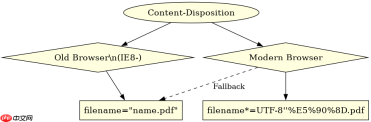
当文件名包含中文或特殊字符时,浏览器可能无法正确解析。解决方法是使用 RFC 5987 标准的 filename*=UTF-8''... 格式,同时保留一个纯ASCII的 filename 作为兼容旧浏览器的后备方案。
<?php $file = 'report_2023.pdf';
$filePath = '/path/to/files/' . $file;

if (!file_exists($filePath)) {
    http_response_code(404);
    exit('File not found');
}

// 设置 MIME 类型
header('Content-Type: application/pdf');

// 设置下载头部,支持中文文件名
$encodedName = rawurlencode($file);
header("Content-Disposition: attachment; filename=\"{$file}\"; filename*=UTF-8''{$encodedName}");

// 设置文件大小
header('Content-Length: ' . filesize($filePath));

// 清除缓冲区并输出文件
if (ob_get_level()) ob_end_clean();
readfile($filePath);
exit;
大文件下载的内存与超时控制
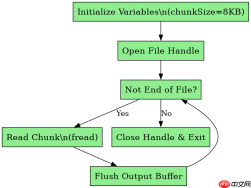
对于大文件,直接 readfile() 可能导致内存溢出或连接超时。最佳实践是分块读取(Chunked Reading),每次只读取固定大小的字节块并立即输出,配合 set_time_limit() 延长执行时间,确保下载稳定完成。

Build MCP servers and clients for PHP applications with the official PHP SDK
下载
使用官方Model Context Protocol PHP SDK将PHP应用程序功能暴露为MCP工具、资源和提示,用于代理工作流。
<?php $file = 'large_data.bin';
$filePath = '/path/to/large/' . $file;

if (!file_exists($filePath)) {
    http_response_code(404);
    exit('File not found');
}

// 允许长时间运行
set_time_limit(0);

header('Content-Type: application/octet-stream');
header('Content-Disposition: attachment; filename="' . basename($filePath) . '"');
header('Content-Length: ' . filesize($filePath));

// 分块读取
$chunkSize = 8192; // 8KB
$handle = fopen($filePath, 'rb');
if ($handle === false) exit('Error opening file');

while (!feof($handle)) {
    echo fread($handle, $chunkSize);
    flush(); // 强制刷新输出缓冲
}
fclose($handle);
exit;
如何验证下载请求是否被正确拦截?
在开发环境中,可以通过检查响应头中的 Content-Disposition 字段来验证。如果该字段存在且值为 attachment,则说明服务器已指示浏览器触发下载行为而非内联显示。若未看到下载弹窗,需检查浏览器设置或网络代理是否拦截了此类响应。
php免费学习视频:立即使用
踏上前端学习之旅,开启通往精通之路!从前端基础到项目实战,循序渐进,一步一个脚印,迈向巅峰!





