使用npoi库读取excel时,可以通过检查单元格的hyperlink属性来获取超链接地址。具体做法是遍历工作表中的单元格,判断其类型是否为hyperlink,如果是则提取其linktext或address属性。

NPOI中如何识别并提取超链接
在NPOI中,每个单元格都有一个Hyperlink属性,当单元格包含超链接时,该属性不为null。通过判断Hyperlink.Type是否为HyperlinkType.URL或HyperlinkType.File,可以确定超链接的类型,并进一步获取其地址。
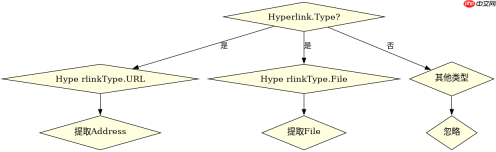
XSSFWorkbook workbook = new XSSFWorkbook("path/to/your/excel.xlsx");
ISheet sheet = workbook.GetSheetAt(0);
for (int rowIdx = 0; rowIdx <h2>Apache POI与NPOI的对比</h2><p>Apache POI和NPOI在处理超链接时的逻辑相似,但API细节有所不同。Apache POI使用getCell().getHyperlink()方法,而NPOI直接使用cell.Hyperlink属性。两者都能有效提取超链接地址,但在处理复杂Excel文件时,NPOI可能更轻量级。</p><div class="aritcle_card flexRow artxards">
											<div class="artcardd flexRow">
												<a class="aritcle_card_img" rel="nofollow" href="/xiazai/skill12858" title="Excel公式工具(专业版)"><img
														src="https://img.php.cn/upload/skill/001/246/273/6adaf20dee630206.jpg" alt="Excel公式工具(专业版)" onerror="this.onerror='';this.src='/static/lhimages/moren/morentu.png'" ></a>
												<div class="aritcle_card_info flexColumn">
													<a rel="nofollow" href="/xiazai/skill12858" title="Excel公式工具(专业版)" class="overflowclass">Excel公式工具(专业版)</a>
													<p class="overflowclass">从自然语言描述生成Excel公式,诊断表格错误,支持VLOOKUP、条件求和等常用函数。</p>
												</div>
												<a rel="nofollow" href="/xiazai/skill12858" title="Excel公式工具(专业版)" class="aritcle_card_btn flexRow flexcenter"><b></b><span>下载</span>
												</a>
											</div>
										</div><p><img src="https://img.php.cn/upload/article/001/431/639/179513492876461.png?x-oss-process=image/resize,p_40" alt="C#读取Excel时,怎么获取单元格中的超链接地址?"></p><pre class="brush:php;toolbar:false;">// Apache POI示例
Workbook workbook = WorkbookFactory.create(new File("path/to/your/excel.xlsx"));
Sheet sheet = workbook.getSheetAt(0);
for (Row row : sheet) {
    for (Cell cell : row) {
        Hyperlink hyperlink = cell.getHyperlink();
        if (hyperlink != null) {
            String linkAddress = hyperlink.getUri();
            System.out.println("Row " + row.getRowNum() + ", Cell " + cell.getColumnIndex() + ": " + linkAddress);
        }
    }
}
如何处理无超链接的单元格
在遍历单元格时,如果单元格没有超链接,其Hyperlink属性将为null。因此,在提取超链接地址前,必须检查Hyperlink属性是否不为null,以避免空引用异常。