






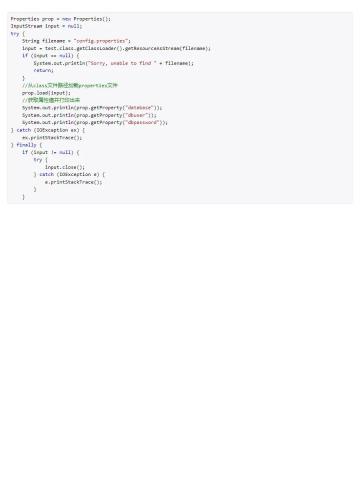
java 读取含中文的 properties 文件时,可用 files.newbufferedreader(path, standardcharsets.utf_8) 创建 reader,再交给 properties.load(reader)。load(inputstream) 使用 iso-8859-1 解释字节,不能直接替代 utf-8 读取。以下使用 jdk 17,三个 main 程序分别替换 main.java,执行 javac -encoding utf-8 main.java 和 java main。

用 UTF-8 Reader 读取中文配置并关闭文件资源
示例先创建临时配置文件,再按相同编码读取并验证。实际项目中,把临时文件路径换成自己的 config.properties 即可;try-with-resources 会关闭 Reader,finally 删除本例生成的临时文件。
import java.nio.charset.StandardCharsets;
import java.nio.file.Files;
import java.nio.file.Path;
import java.io.Reader;
import java.util.Properties;

public class Main {
    public static void main(String[] args) throws Exception {
        Path path = Files.createTempFile("config-demo-", ".properties");
        try {
            Files.writeString(path, "service.name=订单服务\nport=8080\n", StandardCharsets.UTF_8);
            Properties config = new Properties();
            try (Reader reader = Files.newBufferedReader(path, StandardCharsets.UTF_8)) {
                config.load(reader);
            }
            if (!"订单服务".equals(config.getProperty("service.name"))) {
                throw new AssertionError("中文配置不一致");
            }
            System.out.println(config.getProperty("service.name"));
        } finally {
            Files.deleteIfExists(path);
        }
    }
}
预期输出“订单服务”。编码应由文件格式约定决定,不要发现乱码后在字符串上反复转码。properties 自身的反斜线转义仍然生效;需要保留字面反斜线时,应按 properties 语法转义。
读取缺失项的默认值,区分空字符串
getProperty(key, defaultValue) 在该键没有字符串值时提供默认值。键存在且值为空字符串时,不会自动采用默认值。以下使用 StringReader 演示已经解码的配置文本,它不负责文件字节编码。

FilePond 是一个 JavaScript 文件上传库,支持通过拖拽、粘贴和 API 方式处理文件、目录、URL 和 Data URI。它包含内置的图像优化功能、异步分块上传功能,并提供了适用于 React、Vue、Angular 和 Svelte 的适配器。
import java.io.StringReader;
import java.util.Properties;

public class Main {
    public static void main(String[] args) throws Exception {
        Properties config = new Properties();
        try (StringReader reader = new StringReader("service.name=\nport=8080\n")) {
            config.load(reader);
        }
        if (!config.getProperty("host", "127.0.0.1").equals("127.0.0.1")) {
            throw new AssertionError();
        }
        if (!config.getProperty("service.name", "默认服务").isEmpty()) {
            throw new AssertionError("空字符串不会触发默认值");
        }
        System.out.println("host=" + config.getProperty("host", "127.0.0.1"));
        System.out.println("service.name.length=" + config.getProperty("service.name").length());
    }
}
预期 host=127.0.0.1,名称长度为 0。如果空值也应视为未配置,需要再检查 isBlank 并明确替代策略;默认值参数不会完成这一步。
将端口字符串转换为整数,并检查有效范围
Properties 不会自动把 port 转换成数字。先取得字符串并 trim,再调用 Integer.parseInt,最后按业务限制验证范围。这里把合法端口限定为 1 到 65535,不把解析成功等同于可使用。
import java.util.Properties;

public class Main {
    static int readPort(Properties config) {
        String raw = config.getProperty("port", "8080").trim();
        final int value;
        try {
            value = Integer.parseInt(raw);
        } catch (NumberFormatException error) {
            throw new IllegalArgumentException("port 必须是整数", error);
        }
        if (value  65535) {
            throw new IllegalArgumentException("port 超出 1 到 65535");
        }
        return value;
    }
    public static void main(String[] args) {
        Properties config = new Properties();
        if (readPort(config) != 8080) throw new AssertionError();
        config.setProperty("port", " 9000 ");
        if (readPort(config) != 9000) throw new AssertionError();
        for (String invalid : new String[] {"abc", "0", "70000", ""}) {
            config.setProperty("port", invalid);
            try {
                readPort(config);
                throw new AssertionError("无效端口不应通过");
            } catch (IllegalArgumentException expected) {
                System.out.println("拒绝端口:" + invalid);
            }
        }
    }
}
无效配置应在启动检查时明确报错,避免默默换成默认值掩盖填写问题。这个函数只验证配置格式与范围,不检查端口是否被占用,也不替代实际服务启动检查。
Java免费学习笔记:立即使用
解锁 Java 大师之旅:从入门到精通的终极指南


