






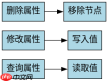
在 javascript 中配置节点属性的增删改查,核心是操作 dom 元素对象。通过 document.queryselector() 获取目标节点后,直接读写其属性或使用 setattribute、removeattribute 方法即可实现。对于自定义属性,推荐使用 dataset 接口;对于标准 html 属性,直接赋值或调用属性方法更直观。
如何查询节点的现有属性值
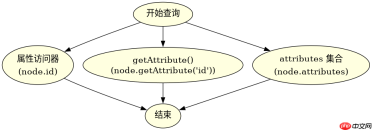
查询节点属性时,优先使用属性访问器(如 .id、.className)获取当前状态,或使用 getAttribute() 读取原始 HTML 中的值。若需遍历所有属性,可使用 attributes 集合配合 NamedNodeMap 接口进行迭代。
const node = document.getElementById('myElement');

// 1. 通过属性访问器查询(反映当前 DOM 状态)
console.log(node.id); // 输出: "myElement"
console.log(node.className); // 输出: "active"

// 2. 通过 getAttribute 查询(反映 HTML 源码中的值)
console.log(node.getAttribute('data-status')); // 输出: "loaded"

// 3. 遍历所有属性
for (let attr of node.attributes) {
    console.log(`${attr.name}: ${attr.value}`);
}
预期结果:控制台依次打印 ID、类名、自定义属性值以及所有属性的键值对。注意 getAttribute 返回的是字符串,而属性访问器可能返回布尔值或数字等特定类型。
如何修改和删除节点的属性
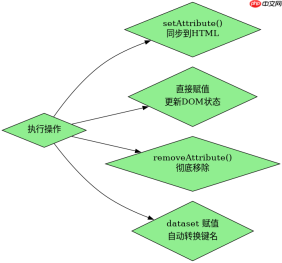
修改属性时,直接赋值给属性对象可更新 DOM 状态,使用 setAttribute() 可确保同步到 HTML 标记。删除属性则使用 removeAttribute() 移除指定名称的属性,或通过设置属性值为 null(部分属性支持)来重置。

const node = document.getElementById('myElement');

// 1. 修改标准属性
node.id = 'newId'; // 直接赋值
node.setAttribute('class', 'updated-class'); // 同步到 HTML

// 2. 修改自定义数据属性
node.dataset.status = 'active'; // 等价于 setAttribute('data-status', 'active')

// 3. 删除属性
node.removeAttribute('id'); // 完全移除 id 属性
node.dataset.status = undefined; // 移除 data-status 属性

// 4. 验证结果
console.log(node.hasAttribute('id')); // false
console.log(node.getAttribute('class')); // "updated-class"
预期结果:id 属性被移除,class 变为 updated-class,data-status 被清除。使用 hasAttribute() 可验证属性是否存在。
当节点属性包含特殊字符时如何处理
当属性值包含空格、引号或特殊符号时,直接使用 setAttribute() 会自动处理转义,但手动拼接字符串时需小心。对于 dataset,JavaScript 会自动将驼峰命名转换为连字符格式,并处理非字母数字字符。若属性值来自用户输入,建议使用 textContent 或 innerText 避免 XSS,而非直接插入属性值。
const node = document.getElementById('myElement');

// 1. 安全设置含特殊字符的属性
const userInput = '<script>alert(1)</script>';
node.setAttribute('data-input', userInput); // 自动转义为 <script>...

// 2. dataset 自动处理命名转换
node.dataset.myCustomAttr = 'value with spaces'; // 生成 data-my-custom-attr

// 3. 验证转义效果
console.log(node.getAttribute('data-input')); // 输出转义后的字符串
console.log(node.dataset.myCustomAttr); // 输出: "value with spaces"</script>
预期结果:data-input 的值被正确转义,防止脚本注入;dataset 的键名自动转换为合法的 HTML5 数据属性格式。这确保了即使输入包含危险字符,属性值也能安全存储。
Java免费学习笔记:立即使用
解锁 Java 大师之旅:从入门到精通的终极指南





