






使用 fetch() 函数发送 get 请求并处理响应,核心做法是调用该函数传入 url,随后通过链式调用 .then() 捕获响应对象,先检查 response.ok 判断 http 状态码是否正常,再调用 response.json() 或 response.text() 解析数据。这样做会得到一个 promise,最终在后续的 .then() 中拿到解析后的 json 对象或字符串。如果网络中断或服务器返回 4xx/5xx 错误,fetch 本身不会抛出异常,必须手动检查状态码或在 .catch() 中统一处理错误。

如何获取响应头中的自定义字段
要获取响应头中的自定义字段,需要在解析响应体之前访问 response.headers 对象。由于 Fetch API 出于安全考虑默认只暴露部分简单标头(如 Content-Type),若要读取自定义标头(如 X-Custom-Header),服务器必须在响应头中包含 Access-Control-Expose-Headers 配置。获取方法是调用 response.headers.get('Header-Name'),该方法返回字符串值或 null。若未配置跨域白名单,浏览器将拦截对该字段的访问,导致返回 null。
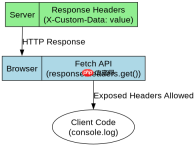
const url = 'https://api.example.com/data';

fetch(url)
  .then(response => {
    if (!response.ok) {
      throw new Error(`HTTP error! status: ${response.status}`);
    }
    // 获取自定义响应头
    const customHeader = response.headers.get('X-Custom-Data');
    console.log('Custom Header:', customHeader);
    return response.json();
  })
  .then(data => {
    console.log('Parsed Data:', data);
  })
  .catch(error => {
    console.error('Fetch failed:', error);
  });
如何处理 POST 请求中的 JSON 负载
处理 POST 请求中的 JSON 负载,需要在 fetch() 的第二个参数对象中设置 method: 'POST'、headers 以及 body。其中 headers 必须包含 'Content-Type': 'application/json' 以告知服务器数据格式,body 需使用 JSON.stringify() 将 JavaScript 对象转换为 JSON 字符串。服务器接收到后,通常也会返回 JSON 格式的响应,处理方式与 GET 请求相同,即调用 response.json() 进行解析。若 body 未正确序列化或 Content-Type 不匹配,服务器可能返回 400 Bad Request 错误。


const apiUrl = 'https://api.example.com/users';
const userData = { name: 'Alice', age: 30 };

fetch(apiUrl, {
  method: 'POST',
  headers: {
    'Content-Type': 'application/json'
  },
  body: JSON.stringify(userData)
})
  .then(response => {
    if (!response.ok) {
      throw new Error(`Server responded with ${response.status}`);
    }
    return response.json();
  })
  .then(result => {
    console.log('User created:', result);
  })
  .catch(err => {
    console.error('Request failed:', err);
  });
基于程序中某个输入、条件或结果的具体问题
当 fetch() 遇到网络断开或 DNS 解析失败时,Promise 会直接进入 .catch() 分支并抛出 TypeError。这与 HTTP 状态码错误不同,后者属于正常响应但状态码非 2xx,需要通过 response.ok 判断。在实际开发中,应区分这两种情况:网络错误通常在 .catch() 中处理并重试或提示用户检查网络;而业务逻辑错误(如 404 或 500)应在 .then() 中通过检查状态码后抛出错误,以便统一处理。这种分离确保了错误处理的准确性,避免将网络故障误判为服务器业务错误。
大量免费API接口:立即使用
涵盖生活服务API、金融科技API、企业工商API、等相关的API接口服务。免费API接口可安全、合规地连接上下游,为数据API应用能力赋能!





