






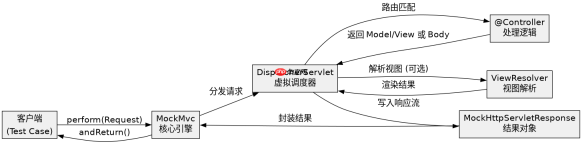
使用 mockmvc 测试 web 层的核心做法是构建一个不启动真实 servlet 容器的虚拟环境,通过模拟 http 请求来验证控制器的响应。你需要利用 mockmvcbuilders.standalonesetup() 或 webappcontextsetup() 初始化 mockmvc 实例,然后调用 .perform(mockmvcrequestbuilders.get(...)) 发起请求,并使用 .andexpect() 链式断言来检查状态码、json 内容或模型属性。
如何配置 MockMvc 以支持 JSON 序列化与反序列化
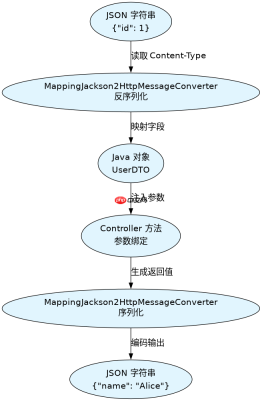
为了让 MockMvc 能够正确处理 Java 对象与 JSON 之间的转换,必须确保测试类路径下存在 Jackson 依赖,并在构建器中注册 MappingJackson2HttpMessageConverter。这样在调用 .content(JsonInput) 发送请求时,框架会自动将其反序列化为 Controller 参数;在接收响应时,也能将返回的对象序列化为 JSON 字符串供断言使用。
import org.springframework.test.web.servlet.MockMvc;
import org.springframework.test.web.servlet.setup.MockMvcBuilders;
import org.springframework.context.annotation.Bean;
import org.springframework.http.converter.json.MappingJackson2HttpMessageConverter;
import org.springframework.stereotype.Controller;
import org.springframework.web.bind.annotation.GetMapping;
import org.springframework.web.bind.annotation.RequestMapping;
import org.springframework.web.bind.annotation.ResponseBody;

import java.util.HashMap;
import java.util.Map;

@Controller
@RequestMapping("/api")
class TestController {
    @GetMapping("/user")
    @ResponseBody
    public Map<string object> getUser() {
        Map<string object> map = new HashMap();
        map.put("id", 1);
        map.put("name", "Alice");
        return map;
    }
}

public class MockMvcJsonTest {
    private MockMvc mockMvc;

    // 模拟 Spring 容器上下文
    private static class Config {
        @Bean
        public TestController testController() {
            return new TestController();
        }
        @Bean
        public MappingJackson2HttpMessageConverter jacksonConverter() {
            return new MappingJackson2HttpMessageConverter();
        }
    }

    public void setup() {
        // 使用 standaloneSetup 并手动添加消息转换器
        mockMvc = MockMvcBuilders.standaloneSetup(new TestController())
                .setMessageConverters(new MappingJackson2HttpMessageConverter())
                .build();
    }
}</string></string>
如何处理 Controller 中的依赖注入与 Service 层隔离
在单元测试中,通常希望隔离 Service 层的逻辑,只测试 Controller 的路由和参数绑定。可以通过 Mockito 创建 Service 的 Mock 对象,并将其注入到 Controller 中。在使用 standaloneSetup 时,直接传入带有 Mock 依赖的 Controller 实例即可实现这种隔离,避免触发真实的数据库连接或外部服务调用。


import org.mockito.Mockito;
import org.junit.jupiter.api.BeforeEach;
import org.junit.jupiter.api.Test;
import org.springframework.beans.factory.annotation.Autowired;
import org.springframework.boot.test.autoconfigure.web.servlet.WebMvcTest;
import org.springframework.boot.test.mock.mockito.MockBean;
import org.springframework.test.web.servlet.MockMvc;
import org.springframework.stereotype.Service;

@Service
class UserService {
    public String findNameById(Long id) {
        return "Bob"; // 实际业务逻辑
    }
}

@Controller
@RequestMapping("/users")
class UserController {
    private final UserService userService;

    public UserController(UserService userService) {
        this.userService = userService;
    }

    @GetMapping("/{id}")
    @ResponseBody
    public String getName(Long id) {
        return userService.findNameById(id);
    }
}

// 使用 @WebMvcTest 自动配置 MockMvc 并扫描 Controller
@WebMvcTest(UserController.class)
class UserControllerTest {
    @Autowired
    private MockMvc mockMvc;

    @MockBean
    private UserService userService; // 自动替换为 Mock 对象

    @BeforeEach
    void setUp() {
        Mockito.when(userService.findNameById(1L)).thenReturn("MockedBob");
    }

    @Test
    void shouldReturnMockedName() throws Exception {
        mockMvc.perform(get("/users/1"))
               .andExpect(status().isOk())
               .andExpect(content().string("MockedBob"));
    }
}
当 Service 抛出异常时 MockMvc 如何捕获错误响应
如果 Service 层抛出了运行时异常,Controller 通常会将其转换为 HTTP 错误状态码(如 500)或通过全局异常处理器返回特定的 JSON 错误结构。在测试中,可以使用 .andExpect(status().isInternalServerError()) 或直接断言响应体中的错误字段来验证这一行为。若使用了 @ControllerAdvice,需确保在测试配置中加载了该 Advice,以便正确拦截异常并返回预期的错误格式。
Java免费学习笔记:立即使用
解锁 Java 大师之旅:从入门到精通的终极指南


