






在 java 日志记录中,debug 级别用于记录程序运行时的详细诊断信息,这些信息对排查问题至关重要,但在正常生产环境中通常不需要输出。具体做法是:在关键逻辑分支、循环内部或方法入口处调用 logger.debug(),并传入变量值或状态描述;确保应用配置中将对应包的日志级别设置为 debug 才能看到这些输出,否则它们会被静默丢弃。

如何正确配置日志级别以启用 debug 输出
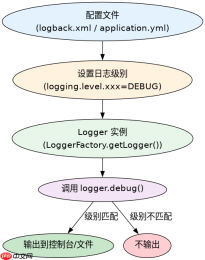
要看到 debug 级别的日志,必须在配置文件(如 logback.xml 或 application.yml)中显式设置日志级别。默认情况下,大多数框架的根级别是 INFO,因此 debug 消息不会显示。你需要将特定包或全局级别调整为 DEBUG。例如,在 Spring Boot 中,可以通过 logging.level.com.example=DEBUG 来开启指定包的调试信息。这样做的好处是可以在不重启应用的情况下(如果支持动态刷新)或重新部署时,精确控制哪些部分产生详细日志,避免生产环境日志量过大。
import org.slf4j.Logger;
import org.slf4j.LoggerFactory;

public class DebugExample {
    private static final Logger logger = LoggerFactory.getLogger(DebugExample.class);

    public void process(int value) {
        logger.debug("Processing value: {}", value);
        if (value <p>上述代码展示了如何在方法中使用 <code>debug</code> 级别。当配置为 <code>DEBUG</code> 时,控制台会输出 "Processing value: 5" 和 "Value is positive, continuing"。如果配置为 <code>INFO</code>,则没有任何输出。这种机制允许开发者在开发阶段获取详细信息,而在生产阶段保持日志简洁。</p><h2>debug 级别与 info 级别的区别及适用场景</h2><p><code>info</code> 级别用于记录系统运行的关键流程节点,如服务启动、请求处理开始/结束、业务操作成功等,这些信息对监控应用健康状态非常重要。而 <code>debug</code> 级别则更侧重于内部细节,如变量当前值、中间计算结果、条件判断的具体路径等。例如,在处理用户登录时,<code>info</code> 可能记录 "User login successful for user: admin",而 <code>debug</code> 可能记录 "Password hash comparison result: true, session created: true"。使用 <code>debug</code> 的场景通常是当你需要追踪某个复杂逻辑的执行路径,或者验证某个假设是否成立时。过度使用 <code>debug</code> 会导致日志文件迅速膨胀,影响性能和分析效率,因此应仅在必要时使用。</p><div class="aritcle_card flexRow artxards">
											<div class="artcardd flexRow">
												<a class="aritcle_card_img" rel="nofollow" href="/xiazai/skill13095" title="Build Java agent transport gateways with Atmosphere"><img
														src="https://img.php.cn/upload/skill/001/246/273/6adaf20e352aa140.jpg" alt="Build Java agent transport gateways with Atmosphere" onerror="this.onerror='';this.src='/static/lhimages/moren/morentu.png'" ></a>
												<div class="aritcle_card_info flexColumn">
													<a rel="nofollow" href="/xiazai/skill13095" title="Build Java agent transport gateways with Atmosphere" class="overflowclass">Build Java agent transport gateways with Atmosphere</a>
													<p class="overflowclass">使用Atmosphere构建通过WebSocket、SSE、gRPC、WebTransport、MCP、A2A和AG-UI流传输的JVM代理网关,并带有治理钩子。</p>
												</div>
												<a rel="nofollow" href="/xiazai/skill13095" title="Build Java agent transport gateways with Atmosphere" class="aritcle_card_btn flexRow flexcenter"><b></b><span>下载</span>
												</a>
											</div>
										</div><p><img src="https://img.php.cn/upload/article/001/242/473/179488942965929.png?x-oss-process=image/resize,p_40" alt="Java 日志记录中什么时候用 debug 级别"></p><pre class="brush:php;toolbar:false;">import org.slf4j.Logger;
import org.slf4j.LoggerFactory;

public class InfoVsDebugExample {
    private static final Logger logger = LoggerFactory.getLogger(InfoVsDebugExample.class);

    public void handleRequest(String userId) {
        logger.info("Handling request for user: {}", userId);
        // Simulate some processing
        boolean isValid = validateUser(userId);
        if (isValid) {
            logger.debug("User validation passed for: {}", userId);
            logger.info("Request processed successfully for user: {}", userId);
        } else {
            logger.debug("User validation failed for: {}, reason: invalid credentials", userId);
            logger.warn("Invalid request attempt for user: {}", userId);
        }
    }

    private boolean validateUser(String userId) {
        return userId != null && !userId.isEmpty();
    }
}
在这个例子中,info 记录了请求的处理状态,而 debug 记录了验证过程中的具体细节。如果 userId 为空,debug 会输出 "User validation failed for: , reason: invalid credentials",而 info 不会输出任何关于验证失败的信息,只有 warn 会记录警告。这种分层记录方式有助于在不同场景下快速定位问题。
debug 级别在异常处理中的具体应用
在异常处理块中,debug 级别常用于记录异常的上下文信息,如发生异常时的参数值、堆栈跟踪前的状态快照等。这有助于在复现问题时提供足够的线索。例如,在一个数据库查询操作中,如果抛出异常,可以在 catch 块中使用 logger.debug() 记录查询语句和参数,以便后续分析。需要注意的是,debug 不应替代 error 级别,后者用于记录真正需要关注的错误事件。此外,避免在 debug 中记录敏感信息,如密码、密钥等,即使是在调试阶段,也应遵循安全最佳实践。
Java免费学习笔记:立即使用
解锁 Java 大师之旅:从入门到精通的终极指南


