在表单提交失败后显示错误信息,最直接的做法是监听 submit 事件,调用 event.preventdefault() 阻止默认提交行为,然后获取错误数据并更新页面上的提示元素。这样可以在不刷新页面的情况下,将验证错误或服务器返回的错误直接展示给用户。

前端同步验证失败时如何展示错误
当输入内容不符合格式要求(如邮箱格式错误)时,应在 submit 事件中通过 setCustomValidity 或手动操作 DOM 来显示错误。核心逻辑是检查输入值,若无效则设置错误文本并阻止提交。
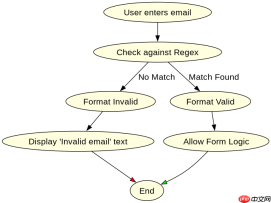
<script>
const form = document.getElementById('myForm');
const emailInput = document.getElementById('emailInput');
const errorMsg = document.getElementById('errorMsg');
form.addEventListener('submit', function(event) {
const email = emailInput.value;
// Simple regex for email validation
const emailRegex = /^[^\s@]+@[^\s@]+\.[^\s@]+$/;
if (!emailRegex.test(email)) {
event.preventDefault(); // Stop form submission
errorMsg.style.display = 'block'; // Show error message
errorMsg.textContent = 'Please enter a valid email address.';
} else {
errorMsg.style.display = 'none'; // Hide error if valid
// In a real scenario, you might proceed with submission here
alert('Form is valid and would submit.');
}
});
</script>
后端异步验证失败时如何展示错误
当需要向服务器发送数据进行验证(如检查用户名是否已存在)时,应使用 fetch 发起请求。如果响应状态非成功或 JSON 中包含错误字段,则在回调中更新错误提示元素,并同样调用 preventDefault() 阻止页面跳转。

<script>
const asyncForm = document.getElementById('asyncForm');
const usernameInput = document.getElementById('usernameInput');
const asyncErrorMsg = document.getElementById('asyncErrorMsg');
asyncForm.addEventListener('submit', async function(event) {
event.preventDefault(); // Always prevent default to handle via JS
const username = usernameInput.value;
try {
const response = await fetch('/api/check-username', {
method: 'POST',
headers: { 'Content-Type': 'application/json' },
body: JSON.stringify({ username })
});
const data = await response.json();
if (!response.ok || data.error) {
asyncErrorMsg.style.display = 'block';
asyncErrorMsg.textContent = data.error || 'Server error occurred.';
} else {
asyncErrorMsg.style.display = 'none';
alert('Username is available!');
// Optionally submit the form now or redirect
// asyncForm.submit();
}
} catch (error) {
asyncErrorMsg.style.display = 'block';
asyncErrorMsg.textContent = 'Network error. Please try again.';
}
});
</script>
如何在同一表单中同时处理多种错误类型
在实际开发中,一个表单可能既包含前端验证也包含后端验证。为了清晰管理,可以将错误信息显示逻辑封装,并根据错误来源(前端/后端)区分样式或位置。例如,前端错误显示在输入框下方,后端错误显示在表单顶部。这种混合场景下,需确保 submit 事件处理器能协调两种验证流程,避免重复提交或冲突。
Java免费学习笔记:立即使用
解锁 Java 大师之旅:从入门到精通的终极指南












