






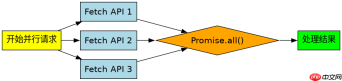
使用 promise.all() 可以并行发起多个 fetch 请求,并在所有请求完成后统一处理结果。只需将多个 fetch 调用放入数组中传给 promise.all(),即可实现并发执行。
如何处理单个接口请求失败的情况
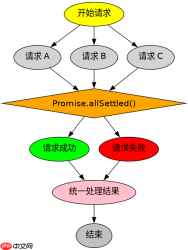
默认情况下,只要有一个请求失败,Promise.all() 就会立即抛出异常并中断后续处理。若需容忍部分失败,应改用 Promise.allSettled(),它能等待所有请求结束并返回每个请求的状态(成功或失败),从而确保程序不会因单一接口错误而崩溃。

Build Java agent transport gateways with Atmosphere
下载
使用Atmosphere构建通过WebSocket、SSE、gRPC、WebTransport、MCP、A2A和AG-UI流传输的JVM代理网关,并带有治理钩子。
const urls = ['https://api.example.com/data1', 'https://api.example.com/data2'];

async function fetchAll() {
  const results = await Promise.allSettled(
    urls.map(url => fetch(url).then(res => res.json()))
  );

  results.forEach((result, index) => {
    if (result.status === 'fulfilled') {
      console.log(`Request ${index} succeeded:`, result.value);
    } else {
      console.error(`Request ${index} failed:`, result.reason);
    }
  });
}

fetchAll();
如何获取每个请求的具体响应状态码
在并行请求中,可以通过遍历 Promise.allSettled() 的结果对象来获取每个请求的 HTTP 状态码。每个 fulfilled 的结果包含一个 Response 对象,其 status 属性即为该接口的状态码,便于进行精细化的错误分类或日志记录。

const urls = ['https://api.example.com/valid', 'https://api.example.com/not-found'];

async function checkStatusCodes() {
  const promises = urls.map(url => fetch(url));
  const responses = await Promise.all(promises);

  responses.forEach((response, index) => {
    console.log(`Request ${index} status code:`, response.status);
  });
}
大量免费API接口:立即使用
涵盖生活服务API、金融科技API、企业工商API、等相关的API接口服务。免费API接口可安全、合规地连接上下游,为数据API应用能力赋能!





