List中有没有空字符串,怎么快速判断?
使用 any() 方法配合 lambda 表达式 s == "" 或 string.isnullorempty(s) 可以快速判断。例如 list.any(s => s == "") 会返回一个布尔值,表示列表中是否存在空字符串。

如何区分空字符串和 null 值?
在 C# 中,空字符串("")和 null 是不同的概念。Any() 方法本身不会抛出异常,但如果列表中包含 null 值,直接使用 s == "" 是安全的,因为 null == "" 的结果是 false。如果需要同时检查 null 和空字符串,应使用 string.IsNullOrEmpty(s)。
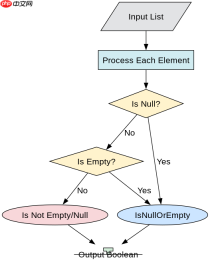

基于程序中某个输入、条件或结果的具体问题
如果列表非常大,Any() 方法会在找到第一个匹配项时立即返回,因此性能优于 Count() 或 Where()。例如,对于包含一百万个元素的列表,Any() 可以在找到第一个空字符串后立即停止遍历,而 Count() 会遍历整个列表。
using System;
using System.Collections.Generic;
using System.Linq;

class Program
{
    static void Main()
    {
        // 示例列表:包含空字符串、null 和非空字符串
        List<string> list = new List<string>
        {
            "hello",
            "",       // 空字符串
            "world",
            null,     // null 值
            "test"
        };

        // 判断是否有空字符串
        bool hasEmptyString = list.Any(s => s == "");
        Console.WriteLine($"Has empty string: {hasEmptyString}"); // 输出: True

        // 判断是否有空字符串或 null
        bool hasNullOrEmpty = list.Any(s => string.IsNullOrEmpty(s));
        Console.WriteLine($"Has empty or null: {hasNullOrEmpty}"); // 输出: True

        // 性能对比:Any() vs Count()
        var largeList = new List<string>(new string[1000000]);
        largeList[500] = ""; // 在第 501 个位置放置空字符串

        var sw = System.Diagnostics.Stopwatch.StartNew();
        bool anyResult = largeList.Any(s => s == "");
        sw.Stop();
        Console.WriteLine($"Any() result: {anyResult}, Time: {sw.ElapsedMilliseconds} ms");

        sw.Restart();
        int countResult = largeList.Count(s => s == "");
        sw.Stop();
        Console.WriteLine($"Count() result: {countResult}, Time: {sw.ElapsedMilliseconds} ms");
    }
}
</string></string></string>
预期结果:
-
hasEmptyString为true -
hasNullOrEmpty为true -
Any()执行时间远小于Count()