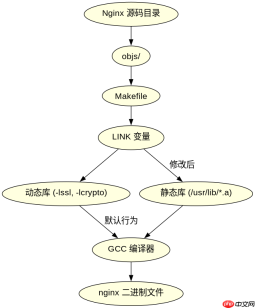
在 linux 中通过源码编译 nginx 实现静态链接第三方库,核心做法是修改 `objs/makefile` 文件,将动态库的 `.so` 依赖替换为对应的 `.a` 静态库,并添加必要的链接参数。具体操作是在配置阶段确保已安装对应库的静态开发包(如 `libssl-dev`),然后在编译前编辑生成的 makefile,在 `link` 变量或 `libs` 变量中指定 `.a` 文件路径,最后执行 `make` 即可生成完全静态链接的二进制文件。

如何确定需要静态链接哪些库
要确定需要静态链接哪些库,首先需要通过 `ldd` 命令检查当前 Nginx 二进制文件的动态依赖,或者查看 `configure` 脚本输出的日志信息。通常 Nginx 依赖的核心库包括 OpenSSL、PCRE 和 zlib。如果希望 Nginx 能够独立运行而不受系统动态库版本影响,就需要将这些库全部静态化。可以通过查找系统中这些库的 `.a` 文件位置来确认它们是否可用,例如使用 `find /usr/lib -name "libssl.a"` 来定位。
#!/bin/bash
# 1. 下载并解压 Nginx 源码
wget http://nginx.org/download/nginx-1.24.0.tar.gz
tar -zxvf nginx-1.24.0.tar.gz
cd nginx-1.24.0

# 2. 安装静态库开发包 (以 Ubuntu/Debian 为例)
# 注意:必须安装 -dev 包,且最好包含静态库 (.a)
sudo apt-get update
sudo apt-get install libssl-dev libpcre3-dev zlib1g-dev

# 3. 配置 Nginx
./configure \
  --prefix=/etc/nginx \
  --sbin-path=/usr/sbin/nginx \
  --conf-path=/etc/nginx/nginx.conf \
  --error-log-path=/var/log/nginx/error.log \
  --http-log-path=/var/log/nginx/access.log \
  --with-http_ssl_module \
  --with-http_v2_module \
  --with-http_realip_module \
  --with-http_addition_module \
  --with-http_sub_module \
  --with-http_dav_module \
  --with-http_flv_module \
  --with-http_mp4_module \
  --with-http_gunzip_module \
  --with-http_gzip_static_module \
  --with-http_random_index_module \
  --with-http_secure_link_module \
  --with-http_stub_status_module \
  --with-http_auth_request_module \
  --with-http_xslt_module=dynamic \
  --with-http_image_filter_module=dynamic \
  --with-http_geoip_module=dynamic \
  --with-threads \
  --with-stream \
  --with-stream_ssl_module \
  --with-stream_realip_module \
  --with-stream_geoip_module=dynamic \
  --with-stream_ssl_preread_module \
  --with-compat \
  --with-file-aio \
  --with-http_v2_module

# 4. 关键步骤:修改 objs/Makefile
# 打开 objs/Makefile,找到 LINK 行
# 原始可能类似: LINK = $(CC) -o nginx ...
# 我们需要将动态库替换为静态库,并添加 -static 标志(可选,视需求而定)
# 更稳妥的方式是手动指定 .a 文件

# 假设我们想静态链接 OpenSSL, PCRE, Zlib
# 找到 objs/Makefile 中的 LIBS 部分,追加或修改为:
# LIBS = -lpthread -lcrypt -lutil -lz -lpcre -lssl -lcrypto

# 但更直接的是修改 LINK 命令,强制链接静态库
# 在 objs/Makefile 中找到:
# $(LINK) ...
# 将其修改为显式指定静态库路径,例如:
# $(CC) -o $@ ... /usr/lib/x86_64-linux-gnu/libssl.a /usr/lib/x86_64-linux-gnu/libcrypto.a /usr/lib/x86_64-linux-gnu/libz.a /usr/lib/x86_64-linux-gnu/libpcre.a

# 5. 编译
make

# 6. 验证
./objs/nginx -V
# 或者使用 ldd 检查是否还有动态依赖
ldd ./objs/nginx
如何修改 Makefile 实现静态链接
修改 Makefile 是实现静态链接的关键步骤。在运行 `./configure` 后,Nginx 会在 `objs` 目录下生成一个 `Makefile`。你需要编辑这个文件,找到 `LINK` 变量定义的行。默认情况下,它可能链接动态库,如 `-lssl -lcrypto`。为了静态链接,你需要将这些 `-l` 选项替换为具体的 `.a` 文件路径。例如,将 `-lssl -lcrypto` 替换为 `/usr/lib/libssl.a /usr/lib/libcrypto.a`。同时,确保没有遗漏其他依赖库,如 `libpcre.a` 和 `libz.a`。此外,有时还需要添加 `-static` 标志来强制静态链接,但这可能导致与 glibc 等核心库的冲突,因此更推荐显式指定所有需要的静态库文件。


基于程序中某个输入、条件或结果的具体问题
当尝试静态链接 Nginx 时,一个常见的问题是链接错误,特别是与 glibc 相关的错误。这是因为 Nginx 本身依赖于 glibc,而 glibc 通常是动态链接的。如果强行使用 `-static` 标志,可能会遇到 `undefined reference to __libc_start_main` 等错误。解决这个问题的方法是不要对整个程序使用 `-static`,而是只针对第三方库进行静态链接。也就是说,在 Makefile 中,只将第三方库(如 OpenSSL, PCRE, Zlib)替换为 `.a` 文件,而保留 glibc 的动态链接。这样可以避免与系统核心库的冲突,同时实现第三方库的静态化。另一个需要注意的问题是,某些模块(如 `--with-http_xslt_module=dynamic`)可能无法静态链接,因为它们依赖于外部库,需要在编译时明确指定为动态加载。
,