






通过拦截器统一处理 fetch 返回的 response 对象,在解析 json 前检查 http 状态码和自定义业务字段,对非预期结果执行重试或抛出异常。具体做法是封装一个请求函数,利用 async/await 获取响应后,先判断 response.ok,再读取 response.json() 并校验业务码,从而确保调用方只收到合法数据。

如何区分网络错误与业务逻辑错误
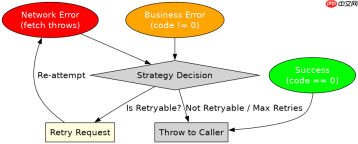
网络错误通常由 fetch 底层抛出(如断网),而业务逻辑错误包含在成功的 HTTP 响应中(如 200 OK 但业务码为 401)。实现策略时,需将这两者分开处理:网络异常直接捕获,业务异常则根据配置决定是重试还是终止。
const API_BASE = 'https://api.example.com';

async function safeFetch(url, options = {}) {
  try {
    const response = await fetch(API_BASE + url, {
      ...options,
      headers: { 'Content-Type': 'application/json', ...options.headers }
    });

    // 1. 检查 HTTP 状态
    if (!response.ok) {
      throw new Error(`HTTP error! status: ${response.status}`);
    }

    // 2. 解析 JSON
    const data = await response.json();

    // 3. 检查业务逻辑状态 (假设后端返回 { code: 0, data: {...} })
    if (data.code !== 0) {
      // 业务错误,可根据 code 决定是否重试
      if (data.code === 401) {
        throw new Error('Unauthorized: Please login again');
      }
      throw new Error(`Business error: ${data.message}`);
    }

    return data.data;

  } catch (error) {
    // 统一处理网络错误或上述抛出的业务错误
    console.error('Request failed:', error.message);
    throw error; // 向上抛出,让调用方知道请求失败
  }
}

// 使用示例
safeFetch('/user/profile')
  .then(profile => console.log('Success:', profile))
  .catch(err => console.log('Handled Error:', err));
如何处理接口请求中的并发冲突与竞态条件
当用户快速切换页面或重复点击提交按钮时,多个 fetch 请求可能同时发出。若后发出的请求先返回,可能会覆盖先发出请求的结果,导致状态不一致。解决此问题的核心策略是为每个请求分配唯一 ID,并在响应返回时验证该 ID 是否仍为当前“活跃”请求。


let currentRequestId = 0;
const activeRequests = new Map();

async function safeConcurrentFetch(url, options = {}) {
  // 生成唯一请求 ID
  const requestId = ++currentRequestId;

  // 标记该请求为活跃状态
  activeRequests.set(requestId, true);

  try {
    const response = await fetch(url, options);

    // 关键步骤:在解析数据前,再次检查该请求是否仍被需要
    // 如果在此期间发起了新请求(requestId 增加),则丢弃旧结果
    if (!activeRequests.has(requestId)) {
      console.warn(`Request ${requestId} cancelled due to race condition`);
      return null;
    }

    const data = await response.json();

    // 清理记录
    activeRequests.delete(requestId);

    return data;
  } catch (error) {
    activeRequests.delete(requestId);
    throw error;
  }
}

// 模拟竞态场景
async function demo() {
  // 发起两个请求,第二个会取消第一个的效果
  const p1 = safeConcurrentFetch('/api/data?slow=true');
  const p2 = safeConcurrentFetch('/api/data?fast=true');

  const [res1, res2] = await Promise.allSettled([p1, p2]);
  console.log('Result 1:', res1.value); // 可能为 null
  console.log('Result 2:', res2.value); // 正常数据
}
基于程序中某个输入、条件或结果的具体问题
在上述代码中,如果后端返回的 data.code 为 0 但 data.data 为 null,程序会正常返回 null。这可能导致调用方后续操作 null 属性时报错。安全策略应在此处增加对有效载荷的非空校验,确保返回的数据结构符合预期,否则抛出明确的类型错误而非静默失败。
大量免费API接口:立即使用
涵盖生活服务API、金融科技API、企业工商API、等相关的API接口服务。免费API接口可安全、合规地连接上下游,为数据API应用能力赋能!





