






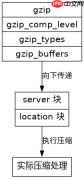
在 nginx 中,gzip 压缩参数需要在 http 全局块中配置才能对所有虚拟主机生效。具体做法是直接在 http { ... } 代码块内添加 gzip on、gzip_types 等指令,这样所有位于该 http 块内的 server 或 location 都会继承这些设置。

哪些 gzip 参数必须在 http 块中配置
必须放在 http 块的参数包括开启开关 gzip、压缩级别 gzip_comp_level、压缩类型 gzip_types 以及缓冲大小 gzip_buffers。这些指令定义了压缩的核心行为,如果放在 server 或 location 中,虽然语法上允许,但通常是为了覆盖全局设置,而非作为基础生效手段。
server {
    listen 80;
    server_name example.com;

    # 这里可以覆盖 http 块中的设置,但通常不需要
    # gzip off;

    location / {
        root /var/www/html;
        index index.html;
    }
}
上述代码展示了 server 块的结构。在实际部署中,我们只需确保 http 块中有正确的配置,server 块保持简洁即可。例如,在 http 块中设置 gzip_types text/plain application/json,则所有 server 下的响应都会尝试对这些 MIME 类型进行压缩。
如何验证 gzip 是否在全局生效
验证方法是通过浏览器开发者工具或 curl 命令检查响应头中的 Content-Encoding。如果看到 gzip,说明压缩已生效。同时检查 Vary: Accept-Encoding 头,确保缓存正确性。


# 使用 curl 测试
$ curl -I -H "Accept-Encoding: gzip" http://example.com/index.html
HTTP/1.1 200 OK
Content-Type: text/html
Content-Encoding: gzip
Vary: Accept-Encoding
运行上述命令后,观察输出结果。若 Content-Encoding 为 gzip,则证明全局配置成功。若未出现,需检查 gzip 是否开启,以及请求的 MIME 类型是否在 gzip_types 列表中。
当特定 location 返回非文本内容时 gzip 会怎样处理
当 location 返回的图片、视频或二进制文件等非文本内容时,即使全局开启了 gzip,Nginx 也不会对其进行压缩。这是因为 gzip_types 默认只包含文本类型(如 text/html),且二进制数据通常已经过其他格式压缩,再次压缩效果甚微且增加 CPU 开销。


