






在 chrome devtools 中查看 javascript 继承机制,核心方法是利用 sources 面板的 call stack(调用栈)和 scope(作用域)窗口。当代码执行到某个函数时,scope 窗口会显示当前上下文的所有变量,其中 $0 代表当前选中的 dom 或对象。通过检查对象的 __proto__ 属性,你可以直观地看到原型链的走向。此外,console 面板中的 console.dir() 命令配合展开树状结构,是快速浏览原型链最便捷的方式。

如何在调试器中追踪原型链
要追踪原型链,需要在代码执行暂停时观察 Scope 区域。当断点触发后,点击 Scope 面板中的 this 或具体对象实例,DevTools 会在右侧展示其属性。对于自定义类或构造函数创建的对象,其原型属性通常标记为 [[Prototype]] 或在某些视图中显示为 __proto__。点击该属性即可展开下一层原型对象,从而逐层向上追溯直到 Object.prototype。这种方法适用于任何基于 ES6 Class 或传统构造函数模式的代码。
class Animal {
  constructor(name) {
    this.name = name;
  }
  speak() {
    console.log(`${this.name} makes a noise.`);
  }
}

class Dog extends Animal {
  constructor(name, breed) {
    super(name);
    this.breed = breed;
  }
  speak() {
    console.log(`${this.name} barks.`);
  }
}

const dog = new Dog('Rex', 'German Shepherd');
// 在控制台输入: console.dir(dog)
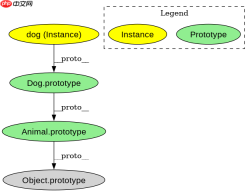
运行上述代码并在 Console 中输入 console.dir(dog),你将看到一个可展开的对象树。展开 [[Prototype]] 节点,你会看到 Dog.prototype,其中包含 speak 方法和 constructor。再次展开 Dog.prototype 的 [[Prototype]],你将到达 Animal.prototype,最后指向 Object.prototype。这种层级结构清晰展示了继承关系。
如何使用 Call Stack 分析继承调用
除了静态查看原型链,动态分析继承方法的调用过程同样重要。当子类方法被调用时,如果它调用了 super() 或父类方法,Call Stack 会记录这一调用序列。在 Sources 面板中,左侧的文件列表下方是 Call Stack 窗口。每一层堆栈帧都对应一个函数调用。点击不同的堆栈帧,Scope 面板中的 this 指针会保持不变(始终指向实例),但局部变量和作用域链会发生变化。这有助于理解 super 关键字在不同堆栈层级中如何解析父类方法。


class Parent {
  greet() {
    return 'Hello from Parent';
  }
}

class Child extends Parent {
  greet() {
    const parentMsg = super.greet();
    return `${parentMsg} and Child`;
  }
}

const child = new Child();
child.greet();
在 Child 类的 greet 方法中设置断点并运行代码。当断点触发时,查看 Call Stack。你会看到两帧:顶层是 child.greet(),下一层可能是 super.greet() 的隐式调用或显式调用。如果手动调用 super.greet(),Stack 中会明确出现父类的方法名。此时观察 Scope 中的 this,它依然指向 Child 实例,证明 this 的动态绑定特性。而 super.greet() 的执行上下文则关联到 Parent.prototype。这种动态视图揭示了继承运行时行为与静态原型结构的区别。
为什么 console.dir 比 console.log 更适合查看继承
在 Console 中,console.log() 和 console.dir() 对对象的输出表现不同。console.log() 倾向于以字符串形式或简洁的对象摘要显示,有时不会完整展开内部的原型链细节,特别是对于复杂嵌套对象。相比之下,console.dir() 专门设计用于以交互式 DOM 树风格显示对象的所有属性,包括那些不可枚举的属性如 [[Prototype]]。这使得开发者能够直接点击箭头展开原型链,而不需要编写额外的遍历代码。对于排查继承相关 bug,例如方法未找到或属性覆盖问题,console.dir() 提供的可视化原型路径更为直观和准确。
Java免费学习笔记:立即使用
解锁 Java 大师之旅:从入门到精通的终极指南





