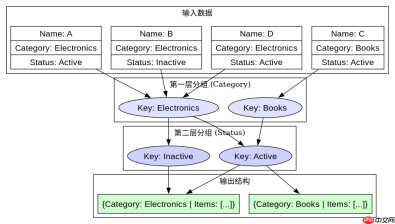
使用linq进行两层分组并分别统计数量,核心做法是调用两次 groupby 方法。首先对第一层条件(如 category)进行分组,然后在每个分组内部再对第二层条件(如 status)进行分组,最后通过 select 投影出层级结构及对应的 count() 结果。

如何按类别和状态进行嵌套分组?
要实现两层分组,需要在查询语法或方法链中连续使用 GroupBy。外层 GroupBy 确定主分组键,内层 GroupBy 基于外层的元素集合再次分组。最终结果是一个包含 IGrouping 结构的序列,其中每一层都可以通过 .Count() 获取该组的元素数量。
using System;
using System.Collections.Generic;
using System.Linq;

public class Product
{
    public string Name { get; set; }
    public string Category { get; set; }
    public string Status { get; set; }
}

public class Program
{
    public static void Main()
    {
        var products = new List<product>
        {
            new Product { Name = "A", Category = "Electronics", Status = "Active" },
            new Product { Name = "B", Category = "Electronics", Status = "Inactive" },
            new Product { Name = "C", Category = "Books", Status = "Active" },
            new Product { Name = "D", Category = "Electronics", Status = "Active" }
        };

        var result = products
            .GroupBy(p => p.Category)
            .Select(g1 => new
            {
                Category = g1.Key,
                Items = g1
                    .GroupBy(p => p.Status)
                    .Select(g2 => new
                    {
                        Status = g2.Key,
                        Count = g2.Count()
                    })
                    .ToList()
            })
            .ToList();

        foreach (var cat in result)
        {
            Console.WriteLine($"Category: {cat.Category}");
            foreach (var item in cat.Items)
            {
                Console.WriteLine($"  Status: {item.Status}, Count: {item.Count}");
            }
        }
    }
}</product>
运行上述代码将输出:
Category: Electronics
Status: Active, Count: 2
Status: Inactive, Count: 1
Category: Books
Status: Active, Count: 1
如何在分组后提取具体的统计明细?
在两层分组完成后,可以通过遍历外层分组键和内层分组键来获取具体的统计明细。外层分组的 Key 代表第一层分类值,内层分组的 Key 代表第二层子分类值。结合 Count() 方法,可以精确得到每个组合下的记录数。如果需要更详细的列表信息,可以直接访问内层分组的 Elements 属性。


当某一层分组结果为空时如何处理?
在两层分组场景中,如果某个外层分组下没有满足内层条件的元素,内层 GroupBy 将不会生成对应的 IGrouping 对象,因此 Items 列表将为空。这符合预期行为,因为 GroupBy 仅返回实际存在的分组。若需确保所有可能的组合都存在(即使计数为0),则需预先构建笛卡尔积或使用 DefaultIfEmpty 等技巧,但标准两层分组仅反映实际数据分布。
,