






使用 try...catch 块包裹对 getcurrentposition 或 watchposition 的调用可以捕获同步抛出的异常,例如传入的参数类型错误。对于异步操作(如用户拒绝定位、超时或网络故障),必须通过配置 errorcallback 回调函数来接收和处理错误信息。

getCurrentPosition 遇到权限被拒会返回什么
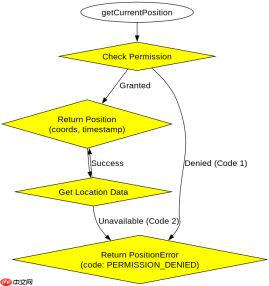
当用户拒绝地理位置访问权限时,getCurrentPosition 不会抛出 JavaScript 异常,而是执行 errorCallback 并返回一个包含 PERMISSION_DENIED 状态的 PositionError 对象。
const options = {
  enableHighAccuracy: true,
  timeout: 5000,
  maximumAge: 0
};

function success(pos) {
  const crd = pos.coords;
  console.log('Success:', crd.latitude, crd.longitude);
}

function error(err) {
  console.warn(`ERROR(${err.code}): ${err.message}`);
}

navigator.geolocation.getCurrentPosition(success, error, options);
运行上述代码并在浏览器中点击“阻止”定位请求后,控制台将输出:
ERROR(1): Permission denied
其中 err.code 为 1,对应常量 PositionError.PERMISSION_DENIED。
watchPosition 在移动过程中如何处理位置更新失败
watchPosition 用于持续监听设备位置变化。如果在持续追踪过程中发生错误(如信号丢失),API 会再次调用 errorCallback,但不会自动停止监听。开发者需要在错误回调中决定是否继续监听或手动清除监控器。


let watchId = null;

function startWatching() {
  watchId = navigator.geolocation.watchPosition(
    (pos) => {
      console.log('Updated:', pos.coords);
    },
    (err) => {
      console.error('Watch Error:', err.message);
      // 可选:根据错误类型决定是否停止
      if (err.code === err.POSITION_UNAVAILABLE) {
        stopWatching();
      }
    },
    { enableHighAccuracy: true }
  );
}

function stopWatching() {
  if (watchId !== null) {
    navigator.geolocation.clearWatch(watchId);
    watchId = null;
    console.log('Stopped watching.');
  }
}
调用 startWatching() 后,若设备进入无信号区域,控制台将打印错误信息并触发 stopWatching() 逻辑,从而释放系统资源。
基于 timeout 参数设置的具体问题
当 options 中的 timeout 值设置过短或设备响应缓慢时,getCurrentPosition 会在指定时间后终止请求,并触发 errorCallback 返回 TIMEOUT 错误状态。
const shortTimeoutOptions = {
  timeout: 100 // 100毫秒
};

navigator.geolocation.getCurrentPosition(
  (pos) => console.log('Got position'),
  (err) => {
    if (err.code === err.TIMEOUT) {
      console.log('Request timed out');
    }
  },
  shortTimeoutOptions
);
在上述代码中,由于等待时间极短,大多数情况下无法在截止前获取到 GPS 数据,因此 error 回调将被执行,且 err.code 等于 PositionError.TIMEOUT(值为 3)。
Java免费学习笔记:立即使用
解锁 Java 大师之旅:从入门到精通的终极指南





