






fetch api 处理 mkv 数据的核心做法是将响应体作为二进制流(blob)读取,随后通过 url.createobjecturl 生成临时本地引用供播放器使用。具体实现时调用 response.blob() 获取 blob 对象,再将其转换为可播放的 media source object (mso) 或直接绑定给 video 标签的 src 属性。由于浏览器原生对 mkv 容器格式的支持有限,直接播放可能失败,通常建议结合 mse (media source extensions) 或转码工具处理,但基础的数据获取与内存管理流程是一致的。

如何正确获取并验证 MKV 文件的二进制完整性
在获取 MKV 数据时,必须确保响应头中的 Content-Type 被正确识别为视频类型,且未发生隐式文本解码。开发者应检查 fetch 返回的 Response 对象,确认其 ok 状态为 true,并通过 response.headers.get('content-type') 验证 MIME 类型。若服务器配置不当返回 text/plain,则 blob 内容将损坏。获取到 Blob 后,可通过检查 Blob 的大小和 slice 前几个字节来初步验证文件头(如 EBML 头部标识),确保数据传输完整。
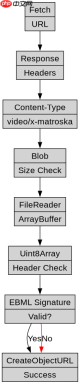
const url = 'https://example.com/video.mkv';

fetch(url)
  .then(response => {
    if (!response.ok) {
      throw new Error(`HTTP error! status: ${response.status}`);
    }
    return response.blob();
  })
  .then(blob => {
    // 验证文件大小
    console.log('File size:', blob.size, 'bytes');

    // 可选:验证文件头 (EBML header starts with 0x1A45DF...)
    const reader = new FileReader();
    reader.onload = function(e) {
      const buffer = e.target.result;
      const view = new Uint8Array(buffer);
      // 简单检查前几个字节是否为 EBML 标识
      if (view[0] === 0x1A && view[1] === 0x45 && view[2] === 0xDF) {
        console.log('Valid MKV/EBML header detected');
      } else {
        console.warn('Header does not match expected EBML signature');
      }
    };
    reader.readAsArrayBuffer(blob.slice(0, 10));

    // 创建播放源
    const videoUrl = URL.createObjectURL(blob);
    const videoElement = document.getElementById('myVideo');
    videoElement.src = videoUrl;
  })
  .catch(error => console.error('Fetch failed:', error));
如何处理大文件 MKV 以避免内存溢出
对于体积较大的 MKV 文件,一次性加载整个 Blob 到内存会导致页面卡顿或崩溃。此时应采用分块下载策略,利用 HTTP Range 请求头只获取文件的部分片段,或者使用 ReadableStream 逐块处理数据。通过设置 fetch 的 headers 参数指定 Range: bytes=0-1048576,可以仅下载前 1MB 数据进行预览或元数据解析。这种方式显著降低了内存峰值占用,适用于需要快速启动播放或进行流式处理的场景。

掌握 ES6+ 特性,包括 async/await、解构、扩展运算符、箭头函数、Promise、模块、迭代器、生成器以及函数式编程模式,编写简洁高效的 Java
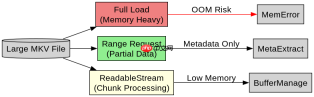
// 示例:使用 Range 请求获取部分数据
const startByte = 0;
const endByte = 1048575; // 1 MB

fetch('https://example.com/large-video.mkv', {
  headers: {
    'Range': `bytes=${startByte}-${endByte}`
  }
})
.then(response => {
  if (response.status === 206) { // Partial Content
    return response.blob();
  } else {
    throw new Error('Server does not support range requests');
  }
})
.then(blob => {
  console.log('Partial blob size:', blob.size);
  // 处理部分数据,例如提取元数据
  const partialUrl = URL.createObjectURL(blob);
  // ... 使用 partialUrl 进行特定操作
});
MKV 数据在浏览器中直接播放会遇到什么限制
即使成功获取了 MKV 的 Blob 数据,大多数现代浏览器(如 Chrome、Firefox、Safari)并不原生支持在
大量免费API接口:立即使用
涵盖生活服务API、金融科技API、企业工商API、等相关的API接口服务。免费API接口可安全、合规地连接上下游,为数据API应用能力赋能!





