






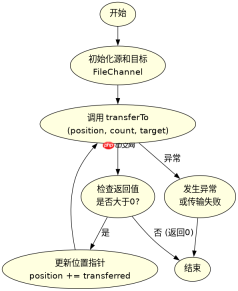
filechannel.transferto() 用于将数据从文件通道传输到接收通道,支持零拷贝(zero-copy)机制,能显著提升大文件传输性能。调用时需指定起始位置、传输字节数和目标 writablebytechannel,该方法会返回实际传输的字节数,若未传完可循环调用直至返回值为0。

transferTo() 方法的基本参数与返回值含义是什么
该方法签名是 long transferTo(long position, long count, WritableByteChannel target)。第一个参数 position 是当前通道的文件指针位置,第二个参数 count 是希望传输的最大字节数,第三个参数 target 是接收数据的通道。返回值表示实际成功传输的字节数,如果返回0表示没有更多数据可读或无法继续传输。
import java.io.FileInputStream;
import java.io.FileOutputStream;
import java.nio.channels.FileChannel;

public class TransferDemo {
    public static void main(String[] args) throws Exception {
        // 创建源文件通道
        FileInputStream fis = new FileInputStream("source.txt");
        FileChannel sourceChannel = fis.getChannel();

        // 创建目标文件通道
        FileOutputStream fos = new FileOutputStream("dest.txt");
        FileChannel destChannel = fos.getChannel();

        // 执行传输:从位置0开始,传输全部可用数据
        long transferred = sourceChannel.transferTo(0, sourceChannel.size(), destChannel);
        System.out.println("Transferred bytes: " + transferred);

        // 关闭资源
        sourceChannel.close();
        destChannel.close();
    }
}
预期结果:
控制台输出:Transferred bytes: [文件大小]
生成一个与源文件内容完全相同的 dest.txt 文件。
transferTo() 与 read() 循环读取相比有什么优势
transferTo() 的核心优势在于它利用了操作系统的零拷贝特性(如 Linux 的 sendfile 系统调用)。传统 read() 方式需要将数据从内核缓冲区复制到用户空间缓冲区,再复制到另一个内核缓冲区,涉及多次上下文切换和数据拷贝。而 transferTo() 允许数据直接在两个内核缓冲区之间传输,减少了 CPU 参与和数据拷贝次数,特别适合大文件网络传输或磁盘间复制。

import java.io.FileInputStream;
import java.io.FileOutputStream;
import java.nio.channels.FileChannel;

public class CompareTransfer {
    public static void main(String[] args) throws Exception {
        String srcPath = "large_file.bin";
        String dstPath = "copy_large_file.bin";

        try (FileInputStream fis = new FileInputStream(srcPath);
             FileOutputStream fos = new FileOutputStream(dstPath)) {

            FileChannel inChannel = fis.getChannel();
            FileChannel outChannel = fos.getChannel();

            // 使用 transferTo 进行高效传输
            long totalBytes = inChannel.size();
            long position = 0;
            long remaining = totalBytes;

            while (remaining > 0) {
                long transferred = inChannel.transferTo(position, remaining, outChannel);
                if (transferred == 0) break; // 防止死循环
                position += transferred;
                remaining -= transferred;
            }
            System.out.println("Transfer completed successfully.");
        }
    }
}
预期结果:
控制台输出:Transfer completed successfully.
程序高效地将 large_file.bin 的内容完整复制到 copy_large_file.bin,且内存占用极低,因为不涉及大块用户空间缓冲区的分配。
当 transferTo() 返回 0 时应该如何处理
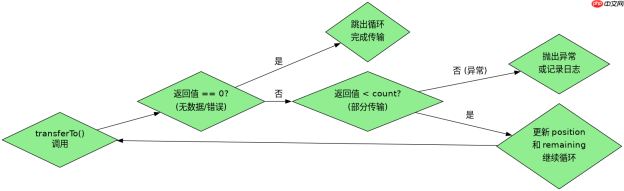
当 transferTo() 返回 0 时,通常意味着两种情况:一是已经传输了所有请求的数据;二是由于某些原因(如目标通道不可写、连接断开等)导致无法继续传输。在循环传输场景中,必须检查返回值是否为0,如果是0则应跳出循环,否则会导致无限循环。此外,如果返回的字节数小于请求的 count,说明部分传输完成,需要更新位置指针并继续传输剩余部分。
Java免费学习笔记:立即使用
解锁 Java 大师之旅:从入门到精通的终极指南


