使用php内置的 number_format() 函数即可将数字格式化为千分位。只需传入需要格式化的数值,并指定小数位数、小数点符号和千分位分隔符,该函数会返回格式化后的字符串。例如调用 number_format(1234567, 2, '.', ',') 会将整数转为带两位小数的千分位字符串。

number_format() 处理浮点数精度问题
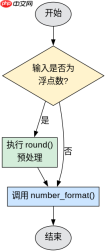
当输入为浮点数时,number_format() 依然有效,但需注意浮点数在内存中的表示可能带来的微小误差。通常建议先对浮点数进行四舍五入或使用 round() 预处理,以确保格式化结果符合预期。例如 number_format(12345.6789, 2) 会正确输出 12,345.68。
$num = 1234567.89;
$formatted = number_format($num, 2, '.', ',');
echo $formatted; // 输出: 12,345,678.90

$floatNum = 12345.6789;
$formattedFloat = number_format(round($floatNum, 2), 2, '.', ',');
echo $formattedFloat; // 输出: 12,345.68
number_format() 多参数与单参数行为差异
number_format() 支持单参数和多参数调用。单参数时仅添加千分位分隔符,不保留小数;多参数时可自定义小数位数及分隔符。若省略小数点或千分位符号,默认使用 . 和 ,。这种灵活性使得该函数适用于不同地区的数字展示需求。

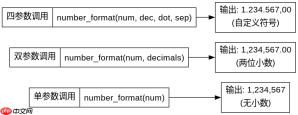
// 单参数:仅加千分位,无小数
$single = number_format(1234567);
echo $single; // 输出: 1,234,567

// 双参数:加千分位并指定小数位数
double = number_format(1234567, 2);
echo $double; // 输出: 1,234,567.00

// 四参数:自定义所有符号
$custom = number_format(1234567, 2, ',', '.');
echo $custom; // 输出: 1.234.567,00
基于 number_format() 返回值的类型与空值处理
number_format() 始终返回字符串类型,即使输入为整数或零。若输入为 null 或非数字字符串,函数会触发警告并返回 0 或 0.00(取决于小数位数)。因此在使用前应确保输入为有效数字,避免意外结果。
php免费学习视频:立即使用
踏上前端学习之旅,开启通往精通之路!从前端基础到项目实战,循序渐进,一步一个脚印,迈向巅峰!