






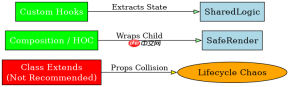
javascript 中无法直接使用 es6 class 的 extends 关键字让 react 组件继承另一个 react 组件,因为 react 官方不推荐这种模式且会导致 props 和 state 处理冲突。正确的做法是使用高阶组件(hoc)或自定义 hook 来复用逻辑。对于类组件,可以通过组合(composition)将子组件作为属性传递;对于函数组件,则通过 hook 提取公共状态逻辑。
类组件如何通过组合实现复用
在类组件中,应放弃继承,转而使用“组合”模式。即创建一个通用组件,接收需要复用的数据或行为作为 props,或者将特定 UI 组件作为 children 传入。这样主组件可以控制渲染逻辑,而通用组件只负责展示或提供基础功能,避免了继承带来的命名冲突和生命周期混乱。
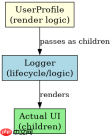
import React, { Component } from 'react';

// 通用日志记录组件
class Logger extends Component {
  componentDidMount() {
    console.log('Logger mounted:', this.props.name);
  }

  render() {
    // 渲染传入的子组件
    return this.props.children;
  }
}

// 主业务组件
class UserProfile extends Component {
  render() {
    return (
      <logger name="UserProfile"><div>
          <h1>User Profile</h1>
          <p>ID: {this.props.userId}</p><div class="aritcle_card flexRow artxards">
											<div class="artcardd flexRow">
												<a class="aritcle_card_img" rel="nofollow" href="/xiazai/skill12690" title="fp-ts-react"><img
														src="https://img.php.cn/upload/skill/001/246/273/6adaf20e695c2374.jpg" alt="fp-ts-react" onerror="this.onerror='';this.src='/static/lhimages/moren/morentu.png'" ></a>
												<div class="aritcle_card_info flexColumn">
													<a rel="nofollow" href="/xiazai/skill12690" title="fp-ts-react" class="overflowclass">fp-ts-react</a>
													<p class="overflowclass">在 React 中使用 fp-ts 的实用模式——hooks、状态、表单、数据获取。在构建使用函数式编程模式的 React 应用时使用。兼容 React 18/</p>
												</div>
												<a rel="nofollow" href="/xiazai/skill12690" title="fp-ts-react" class="aritcle_card_btn flexRow flexcenter"><b></b><span>下载</span>
												</a>
											</div>
										</div>
        </div>
      </logger>
    );
  }
}

export default UserProfile;
函数组件如何通过 Hook 共享状态
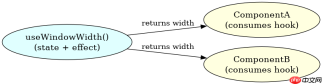
在现代 React 开发中,函数组件配合 Hooks 是更推荐的逻辑复用方式。你可以将共用的状态管理、副作用处理封装在一个自定义 Hook 中。任何函数组件都可以通过调用这个 Hook 来获得相同的状态和行为,这比继承更加灵活且易于测试。
import React, { useState, useEffect } from 'react';

// 自定义 Hook:用于获取窗口宽度
function useWindowWidth() {
  const [width, setWidth] = useState(window.innerWidth);

  useEffect(() => {
    const handleResize = () => setWidth(window.innerWidth);
    window.addEventListener('resize', handleResize);
    return () => window.removeEventListener('resize', handleResize);
  }, []);

  return width;
}

// 组件 A 使用 Hook
function ComponentA() {
  const width = useWindowWidth();
  return <div>Component A Width: {width}</div>;
}

// 组件 B 也使用同一个 Hook
function ComponentB() {
  const width = useWindowWidth();
  return <div>Component B Width: {width}</div>;
}
当 props 传递失败时如何排查
在使用组合或 Hook 时,如果数据没有按预期流动,通常是因为 props 路径错误或 Hook 调用条件不符合规则。例如,在组合模式中,如果父组件没有正确渲染 children,子组件就不会显示。在 Hook 模式中,如果 Hook 在条件语句或循环中调用,React 会报错。务必确保 Hook 总是在组件顶层无条件调用,且 props 传递层级清晰。
Java免费学习笔记:立即使用
解锁 Java 大师之旅:从入门到精通的终极指南





