






sparkaudio 1.0可通过websocket上传16khz、16bit、单声道pcm,再发送input_audio_buffer.commit触发文本推理。先开通对应服务并配置apikey,连接后等待session.created,在首帧传入完整文本指令,随后上传音频分片,并等待response.done确认该轮结束。
准备音频与客户端
python -m pip install websocket-client
以下示例读取无文件头的sample.pcm,单个文件须符合采样规格且不超过单次允许时长。文档当前input_audio_format固定raw,不要直接把MP3或任意WAV头当成PCM数据发送。把服务APIKey放到XF_SPARK_AUDIO_API_KEY环境变量,不写进代码。
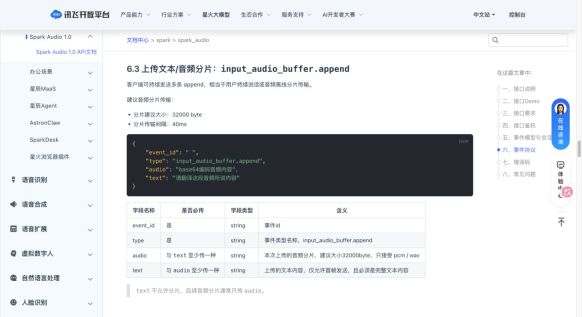
讯飞官方append协议中的文本与音频字段
import base64
import json
import os
import time
import uuid
from pathlib import Path
from websocket import create_connection

key = os.environ["XF_SPARK_AUDIO_API_KEY"]
audio = Path("sample.pcm").read_bytes()
if not audio or len(audio) > 16000 * 2 * 300:
    raise ValueError("PCM must be nonempty and no longer than 300 seconds")
ws = create_connection(
    "wss://tokens.xf-yun.com/omni/v1/realtime",
    header=["Authorization: Bearer " + key],
    timeout=60,
)
def send(kind, **fields):
    ws.send(json.dumps({
        "event_id": uuid.uuid4().hex,
        "type": kind,
        **fields,
    }, ensure_ascii=False))
try:
    while True:
        event = json.loads(ws.recv())
        if event["type"] == "error":
            raise RuntimeError(event.get("error", {}).get("code", "API error"))
        if event["type"] == "session.created":
            break
    send("input_audio_buffer.append", text="请将音频转写为文字。")
    for offset in range(0, len(audio), 32000):
        chunk = base64.b64encode(audio[offset:offset + 32000]).decode("ascii")
        send("input_audio_buffer.append", audio=chunk)
        time.sleep(0.04)
    send("input_audio_buffer.commit")
    while True:
        event = json.loads(ws.recv())
        kind = event["type"]
        if kind == "response.text.delta":
            print(event.get("delta", ""), end="", flush=True)
        elif kind == "error":
            raise RuntimeError(event.get("error", {}).get("code", "API error"))
        elif kind == "response.done":
            response = event.get("response", {})
            if response.get("status") != "completed":
                raise RuntimeError("Response did not complete")
            print("\nUsage:", response.get("usage"))
            break
finally:
    ws.close()
区分增量、全文和完成事件
response.text.delta是文本增量,response.text.done提供本轮全文,response.done包含最终状态与usage。上例只打印增量,避免再把全文追加一次。正式应用应按response_id等关联事件,并在失败时保留必要错误类型,不记录认证头。

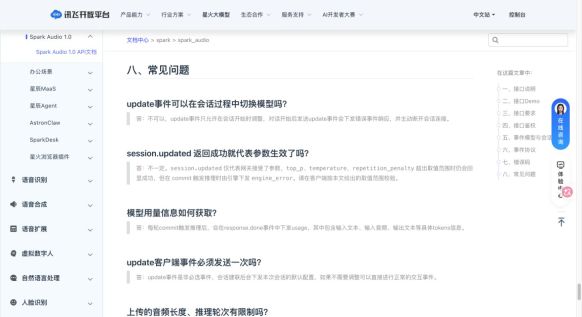
讯飞官方说明commit、会话时长和最终用量
参数与会话限制单独核对
使用默认会话配置可省略session.update;需要设置时只能在会话开始阶段完成。配置响应被接受不代表所有数值都能通过引擎校验,仍要遵守参数表范围。接口不做自动VAD提交,空缓冲区commit会报错;累计30分钟音频、40轮推理、连接120分钟和空闲1分钟等限制也须由应用管理。
Python免费学习笔记(深入):立即使用
在学习笔记中,你将探索 Python 的核心概念和高级技巧!


