






DNAT 规则配置错误导致连接失败怎么排查
排查 dnat 故障时,应优先检查公网 ip、端口映射及协议类型是否匹配。若外部无法访问,通常是因为规则未绑定正确的弹性公网 ip 或目标实例状态异常。确认规则生效后,需验证安全组与系统防火墙是否放行了对应流量。

import boto3
client = boto3.client('ec2', region_name='us-east-1')
response = client.describe_nat_gateways(NatGatewayIds=['nat-0123456789abcdef0'])
gw = response['NatGateways'][0]
print(f"State: {gw['State']}")
print(f"PublicIp: {gw.get('NatGatewayAddresses', [{}])[0].get('AllocationId', 'None')}")
# 假设已获取 AllocationId, 例如 'eipalloc-123'
# 实际排查中需结合 describe_network_acls 和 describe_security_groups
SNAT 出网超时或丢包如何定位原因
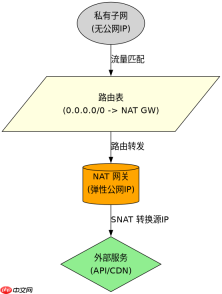
当内网实例通过 NAT 网关访问外网出现超时,重点检查路由表指向是否正确以及带宽峰值是否打满。若路由表未将 0.0.0.0/0 指向 NAT 网关,流量将无法转发。同时,监控 NAT 网关的活跃连接数和新建连接数,若超过规格限制会导致丢包。
# 模拟检查路由表关联
route_table_id = 'rtb-0123456789abcdef0'
client = boto3.client('ec2', region_name='us-east-1')
routes = client.describe_route_tables(RouteTableIds=[route_table_id])
for route in routes['RouteTables'][0]['Routes']:
    if route.get('DestinationCidrBlock') == '0.0.0.0/0':
        target = route.get('GatewayId') or route.get('NatGatewayId')
        print(f"Target for 0.0.0.0/0: {target}")
        break
NAT 网关处于 pending 状态持续超过 10 分钟怎么办
若 NAT 网关长时间停留在 pending 状态,通常是由于子网缺少自动分配公网 IP 功能或路由表配置冲突。需确保子网属性中 MapPublicIpOnLaunch 为真,并检查该子网关联的路由表是否唯一且正确指向 NAT 网关。此外,检查 VPC 的 DNS 支持设置是否正常。





