






取消 pending 任务的核心方法是调用防抖或节流函数返回的 cancel 方法。在实现中,通过 cleartimeout 清除定时器并重置状态即可立即终止等待中的执行逻辑。

如何实现可取消的防抖函数
防抖函数需要返回一个包含 cancel 方法的对象或函数,以便外部调用。在内部,使用 setTimeout 设置延迟执行,并在 cancel 中调用 clearTimeout 清除该定时器,同时清空引用以防止内存泄漏。
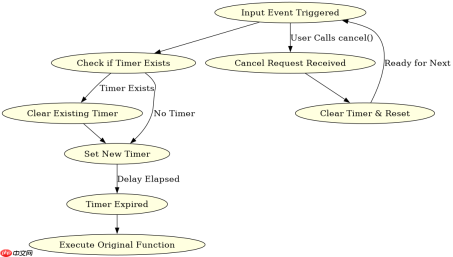
function debounce(fn, delay) {
  let timer = null;
  const debounced = function(...args) {
    if (timer) clearTimeout(timer);
    timer = setTimeout(() => fn.apply(this, args), delay);
  };
  debounced.cancel = () => {
    if (timer) {
      clearTimeout(timer);
      timer = null;
    }
  };
  return debounced;
}
使用示例:
const handleInput = debounce((e) => console.log('Value:', e.target.value), 300);
document.getElementById('input').addEventListener('input', handleInput);
// 当需要取消时:
handleInput.cancel();
如何实现可取消的节流函数
节流函数通常有两种实现方式:时间戳版和定时器版。为了支持取消,我们需要在返回的函数中添加 cancel 方法。对于定时器版,直接清除定时器;对于时间戳版,可以重置最后执行时间或标记为无效。

javascript-typescript-typescript-scaffold
下载
你是 TypeScript 项目架构专家,专注于脚手架搭建生产就绪的 Node.js 和前端应用。生成包含现代工具链(pnpm、Vite、Next.js)、类型
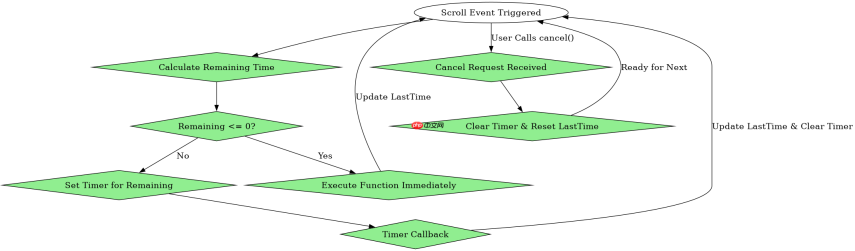
function throttle(fn, interval) {
  let lastTime = 0;
  let timer = null;
  const throttled = function(...args) {
    const now = Date.now();
    const remaining = interval - (now - lastTime);
    if (remaining  {
        lastTime = Date.now();
        timer = null;
        fn.apply(this, args);
      }, remaining);
    }
  };
  throttled.cancel = () => {
    if (timer) {
      clearTimeout(timer);
      timer = null;
    }
    lastTime = 0;
  };
  return throttled;
}
使用示例:
const handleScroll = throttle(() => console.log('Scrolling...'), 1000);
window.addEventListener('scroll', handleScroll);
// 当需要取消时:
handleScroll.cancel();
取消 pending 任务的具体场景与注意事项
在实际开发中,取消 pending 任务常用于用户快速切换输入、页面卸载或组件销毁等场景。例如,在 React 组件卸载时,应调用 cancel 方法以防止在组件已卸载后仍尝试更新状态。此外,取消操作应确保不会触发任何副作用,如网络请求或 DOM 操作,除非这些操作已被明确设计为可取消。
Java免费学习笔记:立即使用
解锁 Java 大师之旅:从入门到精通的终极指南





