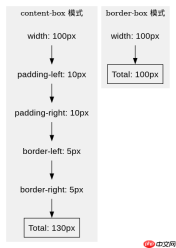
在css中计算包含padding与border的元素实际物理尺寸,需根据`box-sizing`属性决定:若为`content-box`(默认),总宽度等于width + padding-left + padding-right + border-left + border-right;若为`border-box`,总宽度等于width值本身。通过javascript的`getboundingclientrect()`方法可直接获取元素在视口中的实际渲染尺寸,该返回值已自动包含padding和border。

如何手动计算不同box-sizing下的总宽高
当使用默认的`content-box`时,元素的总占据空间需要累加所有内边距和边框宽度。例如一个设置了`width: 100px; height: 50px; padding: 10px; border: 5px solid black;`的元素,其实际物理宽度为130像素,高度为70像素。反之,若设置为`border-box`,则`width`定义的100像素即为最终总宽,内部内容区域会自动收缩以容纳padding和border。
    <style>
        .box-content {
            width: 100px;
            height: 50px;
            padding: 10px;
            border: 5px solid #333;
            box-sizing: content-box;
            background: lightblue;
        }
        .box-border {
            width: 100px;
            height: 50px;
            padding: 10px;
            border: 5px solid #333;
            box-sizing: border-box;
            background: lightgreen;
        }
    </style><div class="box-content">Content Box</div>
    <div class="box-border">Border Box</div>
    <script>
        const contentBox = document.querySelector('.box-content');
        const borderBox = document.querySelector('.box-border');

        console.log('Content Box Width:', contentBox.getBoundingClientRect().width); // 130
        console.log('Content Box Height:', contentBox.getBoundingClientRect().height); // 70

        console.log('Border Box Width:', borderBox.getBoundingClientRect().width); // 100
        console.log('Border Box Height:', borderBox.getBoundingClientRect().height); // 50
    </script>
如何通过API直接获取渲染后的物理尺寸
在实际开发中,最可靠的方式是使用`getBoundingClientRect()`方法。该方法返回一个`DOMRect`对象,其中的`width`和`height`属性直接反映了元素在屏幕上占用的物理像素大小,已经包含了padding和border,无需手动计算。对于需要精确布局的场景,如模态框居中或拖拽调整大小,此API是首选。


<script>
    function getPhysicalSize(element) {
        const rect = element.getBoundingClientRect();
        return {
            physicalWidth: rect.width,
            physicalHeight: rect.height,
            top: rect.top,
            left: rect.left
        };
    }

    const el = document.getElementById('target');
    const size = getPhysicalSize(el);
    console.log(`实际物理尺寸: ${size.physicalWidth} x ${size.physicalHeight}`);
</script>
当元素被隐藏时getBoundingClientRect返回什么
如果元素处于隐藏状态(例如`display: none`),`getBoundingClientRect()`将返回全零的尺寸对象,即`width`和`height`均为0。这是因为浏览器在渲染阶段完全跳过了该元素的布局计算。若需获取隐藏元素的理论尺寸,可临时将其设为`visibility: hidden`并配合`position: absolute`移出文档流,或者使用`offsetWidth`/`offsetHeight`(但需注意它们可能受父级影响)。通常建议在元素可见后调用该API以确保数据准确。
前端入门到VUE实战笔记:立即使用
在学习笔记中,你将探索 前端 的入门与实战技巧!