






spring boot 全局异常处理无法直接捕获健康检查(health check)产生的异常,因为健康检查由 actuator 的独立端点处理,不经过常规的 spring mvc 异常处理器。要捕获并处理这些异常,需要自定义 `healthindicator` 并在其 `health()` 方法中手动捕获异常,或者通过配置 `management.endpoint.health.show-details` 来调整输出策略。

为什么标准 @ExceptionHandler 无效
标准的 `@ControllerAdvice` 和 `@ExceptionHandler` 仅作用于 Spring MVC 的请求映射路径。Actuator 的健康检查端点默认位于 `/actuator/health`,它由 `EndpointRequestCondition` 路由,绕过 DispatcherServlet 的常规异常处理链。因此,任何在健康检查逻辑中抛出的未捕获异常都会导致 HTTP 500 错误,而不会触发全局异常处理器。
import org.springframework.boot.actuate.health.Health;
import org.springframework.boot.actuate.health.HealthIndicator;
import org.springframework.stereotype.Component;

@Component
public class CustomHealthIndicator implements HealthIndicator {
    @Override
    public Health health() {
        try {
            // 模拟可能失败的业务逻辑
            checkDatabase();
            return Health.up().build();
        } catch (Exception e) {
            // 在这里捕获异常并返回 DOWN 状态
            return Health.down()
                .withDetail("error", e.getMessage())
                .build();
        }
    }

    private void checkDatabase() {
        throw new RuntimeException("Simulated DB failure");
    }
}
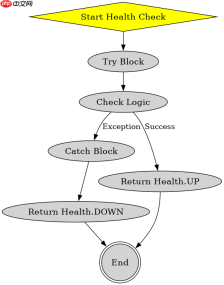
上述代码展示了如何创建一个自定义的 `HealthIndicator`。当 `checkDatabase()` 抛出异常时,`try-catch` 块会捕获它,并返回一个状态为 `DOWN` 的 `Health` 对象,而不是让异常传播到顶层导致 500 错误。这是处理健康检查异常的标准做法。
如何配置健康检查的详细输出
除了自定义指示器,还可以通过配置文件控制健康检查的响应内容。默认情况下,为了安全起见,健康检查只返回状态(UP/DOWN)。如果需要更详细的错误信息,可以修改 `application.yml` 或 `application.properties`。


# application.yml
management:
  endpoint:
    health:
      show-details: always
      show-components: always
设置 `show-details: always` 会在响应中包含每个组件的详细状态和错误信息。如果某个组件抛出异常且未被正确捕获,这些信息将出现在 JSON 响应中,便于调试。但请注意,这可能会暴露敏感信息,生产环境中需谨慎使用。
基于自定义 HealthIndicator 的具体问题
在使用自定义 `HealthIndicator` 时,一个常见的问题是多个指示器之间的依赖关系。如果一个健康检查依赖于另一个服务,而该服务不可用,如何处理这种级联故障?
在自定义 `HealthIndicator` 中,可以通过注入其他 `HealthIndicator` 或业务服务来检查依赖项。如果依赖项失败,当前指示器也应标记为 `DOWN`。例如,在一个检查缓存服务的指示器中,可以注入 Redis 客户端并尝试连接。如果连接失败,则返回 `Health.down()`。这种设计确保了健康检查能够反映系统的整体健康状况,而不仅仅是单个组件的状态。


