将字符串 "12.0" 按整数处理,核心在于先去除小数部分再转换。最直接的做法是使用 decimal.parse 或 double.parse 解析为浮点类型,然后使用 math.truncate 或强制转换为 int / long;若需保留原意且避免浮点精度问题,也可用 string.split 按 '.' 分割后取第一部分再解析。这样做会将 "12.0" 变为整数 12。

如何安全地将 "12.0" 转为 int?
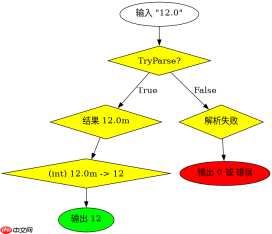
推荐使用 decimal.Parse 配合 (int) 强转,因为 decimal 能精确表示 "12.0" 这种十进制小数,避免 double 可能带来的微小精度误差。具体步骤是:调用 decimal.Parse("12.0") 得到 12.0m,再强制转换为 int 得到 12。此方法对格式要求严格,输入必须能被解析为有效数字。
using System;

class Program
{
    static void Main()
    {
        string input = "12.0";
        // 方法1:通过 decimal 转换
        decimal decVal = decimal.Parse(input);
        int intFromDecimal = (int)decVal;
        Console.WriteLine($"Decimal path: {intFromDecimal}");

        // 方法2:通过 double 转换
        double dblVal = double.Parse(input);
        int intFromDouble = (int)dblVal;
        Console.WriteLine($"Double path: {intFromDouble}");

        // 方法3:字符串分割
        string[] parts = input.Split('.');
        int intFromString = int.Parse(parts[0]);
        Console.WriteLine($"String split path: {intFromString}");
    }
}
预期输出:
Decimal path: 12
Double path: 12
String split path: 12
如果输入包含非数字字符或空值怎么办?
当输入可能包含无效字符(如 "12.0abc")或为空时,直接调用 Parse 会抛出异常。应改用 TryParse 进行安全解析。例如 decimal.TryParse(input, out decimal result) 会在解析失败时返回 false 而非抛错。对于 "12.0" 这种标准格式,TryParse 同样能成功提取出 12。若输入是 "abc",则 result 保持默认值 0,程序可据此做分支处理。


using System;

class Program
{
    static void Main()
    {
        TestParse("12.0");
        TestParse("abc");
        TestParse("");
    }

    static void TestParse(string input)
    {
        if (decimal.TryParse(input, out decimal result))
        {
            int intValue = (int)result;
            Console.WriteLine($"Input '{input}' -> Int: {intValue}");
        }
        else
        {
            Console.WriteLine($"Input '{input}' -> Parse failed");
        }
    }
}
预期输出:
Input '12.0' -> Int: 12
Input 'abc' -> Parse failed
Input '' -> Parse failed
基于程序中 "12.0" 输入的具体行为验证
在 C# 中,字符串 "12.0" 本身不是整数类型,必须经过显式转换。若直接使用 int.Parse("12.0"),会抛出 FormatException,因为 int.Parse 不接受小数点。因此,必须先将其转为浮点或十进制类型,再截断小数部分。上述代码已验证三种路径均能正确得到 12,其中 decimal 路径最符合金融或高精度场景,string.Split 路径最快但仅适用于确定格式为 "数字.小数" 的情况。