






在输入法(ime)处于选字状态时,filament的tagsinput通过监听compositionend事件来避免多生成标签。具体做法是:在input元素的keydown事件中检查是否处于组合输入状态(iscomposing),如果是则不执行添加逻辑;或者更稳健地,在compositionstart时标记状态,在compositionend时再触发添加逻辑。这样能确保只有当用户完成汉字输入并确认选择后,才将文本作为新标签添加,从而避免在拼音输入过程中因按键(如空格、回车)误触发生成多个空标签或错误标签。

如何检测输入法组合状态以拦截添加事件?
可以通过监听input元素的compositionstart和compositionend事件来判断当前是否处于中文输入法的选字阶段。在compositionstart时设置一个标志位,在compositionend时清除该标志位。在keydown事件中,如果标志位为真,则阻止默认的添加行为。这种方法能有效区分用户的真实意图和输入法的中间过程。
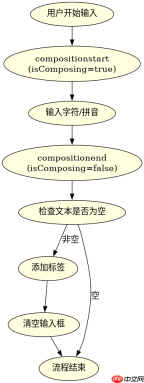

为什么在compositionend时才添加标签能解决多生成问题?
因为compositionend事件只在用户最终确认输入内容(如按下空格键选择汉字)时触发一次,此时input框内的文本已经是完整的词语或句子。如果在keydown中直接添加,可能会在用户按空格切换候选词时就触发添加,导致生成大量未完成的片段。而在compositionend时添加,可以确保只添加用户最终选定的完整文本,从而避免多生成标签的问题。
<template><div class="tags-input">
    <input ref="inputEl" v-model="currentText"><span v-for="tag in tags" :key="tag" class="tag">
      {{ tag }}
      <button>×</button>
    </span>
  </div>
</template><script setup>
import { ref } from 'vue';

const tags = ref([]);
const currentText = ref('');
const isComposing = ref(false);

function onCompositionStart() {
  isComposing.value = true;
}

function onCompositionEnd(e) {
  isComposing.value = false;
  // 在组合结束后,手动触发添加逻辑
  if (currentText.value.trim()) {
    addTag(currentText.value.trim());
    currentText.value = '';
  }
}

function handleAdd() {
  // 如果正在组合输入,则不添加
  if (isComposing.value) return;

  const text = currentText.value.trim();
  if (text) {
    addTag(text);
    currentText.value = '';
  }
}

function addTag(text) {
  if (!tags.value.includes(text)) {
    tags.value.push(text);
  }
}

function removeTag(tag) {
  tags.value = tags.value.filter(t => t !== tag);
}
</script><style scoped>
.tags-input {
  display: flex;
  flex-wrap: wrap;
  gap: 8px;
  padding: 8px;
  border: 1px solid #ccc;
  border-radius: 4px;
}
.tag {
  display: flex;
  align-items: center;
  background: #e0e0e0;
  padding: 4px 8px;
  border-radius: 16px;
}
.tag button {
  margin-left: 4px;
  cursor: pointer;
}
input {
  outline: none;
  flex: 1;
  min-width: 100px;
}
</style>
上述代码展示了如何在Vue组件中实现防多生成标签的逻辑。核心在于使用isComposing标志位来跟踪输入法状态。在compositionstart时设为true,在compositionend时设为false并触发添加。同时,在keydown事件中检查该标志位,如果为true则跳过添加逻辑。这样可以确保只有在用户完成输入后才添加标签,避免了在选字过程中因按键误触而生成多个标签的问题。


