






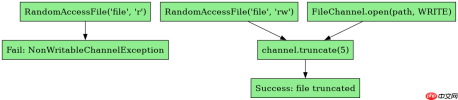
在 java nio 中,使用 filechannel 的 truncate() 方法可以截断文件。调用该方法时,必须确保通道处于打开状态且支持写入操作(即通过 randomaccessfile 以 "rw" 模式或 filechannel.open 以 standardopenoption.write 打开),然后传入目标长度 long size;若指定长度小于当前文件大小,超出部分将被丢弃,大于当前大小则文件扩展并填充零字节。

如何正确打开 FileChannel 以支持 truncate 操作
要成功调用 truncate(),最关键的前提是获取一个可写的 FileChannel。通常通过 RandomAccessFile 的 getChannel() 方法实现,构造时需指定访问模式为 "rw"(读写)。如果仅以只读模式打开,调用 truncate() 会抛出 NonWritableChannelException。此外,通道必须保持打开状态,关闭后调用将引发 ClosedChannelException。
import java.io.RandomAccessFile;
import java.nio.channels.FileChannel;

public class TruncateExample {
    public static void main(String[] args) throws Exception {
        // 1. 创建测试文件并写入初始内容
        String filePath = "test.txt";
        try (RandomAccessFile raf = new RandomAccessFile(filePath, "rw");
             FileChannel channel = raf.getChannel()) {

            // 写入初始数据 "Hello World"
            String data = "Hello World";
            channel.write(java.nio.ByteBuffer.wrap(data.getBytes()));

            System.out.println("原始大小: " + channel.size());

            // 2. 截断文件到较小长度
            long newSize = 5; // 只保留前5个字符
            channel.truncate(newSize);

            System.out.println("截断后大小: " + channel.size());

            // 3. 验证内容
            channel.position(0);
            byte[] buffer = new byte[(int) channel.size()];
            channel.read(buffer);
            System.out.println("截断后内容: " + new String(buffer));
        }
    }
}
上述代码首先创建一个包含 "Hello World" 的文件,然后通过 channel.truncate(5) 将其截断为 5 字节。执行后,文件大小变为 5,剩余内容为 "Hello"。若尝试用只读模式打开,如 new RandomAccessFile(filePath, "r"),则在调用 truncate() 时会立即抛出异常,这体现了权限检查的重要性。
truncate 对文件指针和后续读写的影响
truncate() 操作不会自动重置文件指针(position)的位置,但会影响基于指针的读写行为。如果截断后的新长度小于当前文件指针位置,文件指针会被自动调整到新长度的位置。这意味着后续从指针处开始读取可能会得到空数据或需要重新定位指针。此外,如果截断后文件变大,新增区域填充的是零字节,此时若从原末尾之后开始读取,将读到零值。


import java.io.RandomAccessFile;
import java.nio.channels.FileChannel;

public class TruncatePositionExample {
    public static void main(String[] args) throws Exception {
        String filePath = "test_pos.txt";
        try (RandomAccessFile raf = new RandomAccessFile(filePath, "rw");
             FileChannel channel = raf.getChannel()) {

            // 写入 "ABCDEF"
            channel.write(java.nio.ByteBuffer.wrap("ABCDEF".getBytes()));

            // 移动指针到中间位置
            channel.position(3); // 指向 'D'
            System.out.println("截断前指针位置: " + channel.position());

            // 截断到比当前指针更小的长度
            channel.truncate(2); // 截断为 "AB"

            // 注意:指针被自动调整到 2
            System.out.println("截断后指针位置: " + channel.position());

            // 尝试读取
            byte[] b = new byte[10];
            int read = channel.read(b);
            System.out.println("读取字节数: " + read); // 应为 0,因为指针已在末尾
        }
    }
}
此示例展示了当截断长度小于文件指针时,指针会自动回退到新的文件末尾。在上述代码中,初始指针位于 3,截断到 2 后,指针变为 2。此时再调用 read(),由于指针已处于文件末尾,返回值为 0,未读取到任何数据。这表明在使用 truncate() 后,若需继续读写,应显式调用 channel.position(0) 重置指针,以避免意外行为。
truncate 在文件扩展时的行为与零填充机制
当 truncate(size) 中的 size 大于当前文件大小时,文件会被扩展至指定长度,新增的部分由零字节(\u0000)填充。这一特性可用于预分配空间或初始化文件内容。需要注意的是,扩展操作可能涉及磁盘 I/O,具体性能取决于文件系统实现。此外,扩展后的文件在读取新增区域时,始终返回零字节,直到有实际数据写入覆盖这些位置。
import java.io.RandomAccessFile;
import java.nio.channels.FileChannel;

public class TruncateExpandExample {
    public static void main(String[] args) throws Exception {
        String filePath = "test_expand.txt";
        try (RandomAccessFile raf = new RandomAccessFile(filePath, "rw");
             FileChannel channel = raf.getChannel()) {

            // 初始写入 3 字节
            channel.write(java.nio.ByteBuffer.wrap("XYZ".getBytes()));

            // 扩展到 10 字节
            channel.truncate(10);

            System.out.println("扩展后大小: " + channel.size()); // 10

            // 读取全部数据
            channel.position(0);
            byte[] all = new byte[10];
            channel.read(all);

            // 打印每个字节的十六进制值
            StringBuilder sb = new StringBuilder();
            for (byte b : all) {
                sb.append(String.format("%02X ", b & 0xFF));
            }
            System.out.println("扩展后内容(hex): " + sb.toString());
        }
    }
}
运行该程序,输出显示文件大小为 10,内容前三个字节为 "XYZ" 的 ASCII 码,后七个字节为 "00"。这证实了 truncate() 在扩展文件时确实会用零字节填充空白区域。开发者可利用此特性进行文件缓冲区的预分配,或在网络协议中处理固定长度字段时快速初始化数据块。
Java免费学习笔记:立即使用
解锁 Java 大师之旅:从入门到精通的终极指南


