





给 datetime 设置自定义时区,核心在于使用 withzone() 方法将实例转换为指定时区的视图,或使用 toinstant().atzone() 进行精确转换。以北京时间(asia/shanghai)为例,调用该方法后,时间戳不变但显示的时间值会按新时区调整。若需创建全新对象,可结合 zoneddatetime.of() 并传入 zoneid 参数。

如何获取系统默认时区并转换现有实例
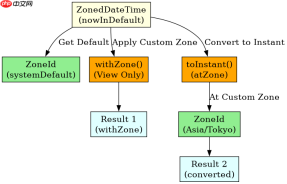
获取系统默认时区可通过 ZoneId.systemDefault() 实现,而转换现有 DateTime 实例则依赖 withZone() 或 toInstant() 链式调用。前者仅改变显示区域,后者确保在 UTC 基准上重新计算本地时间。以下代码演示了从默认时区切换到东京时区的具体过程及输出结果。
import java.time.ZonedDateTime;
import java.time.LocalDateTime;
import java.time.ZoneId;

public class TimeZoneDemo {
    public static void main(String[] args) {
        // 1. 获取当前系统默认时区
        ZoneId defaultZone = ZoneId.systemDefault();
        System.out.println("System Default: " + defaultZone);

        // 2. 创建一个基于默认时区的 ZonedDateTime 实例
        ZonedDateTime nowInDefault = ZonedDateTime.now(defaultZone);
        System.out.println("Original: " + nowInDefault);

        // 3. 定义自定义时区:东京 (Asia/Tokyo)
        ZoneId customZone = ZoneId.of("Asia/Tokyo");

        // 4. 方式一:withZone() - 仅改变时区视图,瞬间不变
        // 注意:如果原时间是 LocalDateTime,需先 atZone()
        ZonedDateTime viewOnly = nowInDefault.withZone(customZone);
        System.out.println("With Zone View: " + viewOnly);

        // 5. 方式二:toInstant().atZone() - 真正的时区转换
        // 适用于需要明确 UTC 基准的场景
        ZonedDateTime converted = nowInDefault.toInstant().atZone(customZone);
        System.out.println("Converted Instant: " + converted);
    }
}
运行上述代码,控制台将依次打印系统默认时区(如 Asia/Shanghai)、原始时间、仅改变视图后的时间以及通过瞬时量转换后的时间。可以看到,withZone() 输出的小时数可能因夏令时或偏移量不同而变化,但 toInstant().atZone() 确保了基于同一绝对时刻的准确映射。
如何处理无效时区 ID 与夏令时冲突
处理无效时区 ID 时,ZoneId.of() 会抛出 DateTimeException,需在调用前验证或使用 ZoneId.getAvailableZoneIds() 过滤。对于夏令时冲突,Java 8+ 的 java.time API 会自动处理重叠或间隙时间,通常采用“向后回拨”或“向前跳跃”策略。以下代码展示了安全获取时区及处理特定日期时区转换的逻辑。

一款AI工具,主要用于Codex 通用编排:利用 `update_plan` 与后台 PTY 终端并行运行 `codex exec` 工作进程,适合需要提升相关任务效率的用户。

import java.time.ZonedDateTime;
import java.time.ZoneId;
import java.time.DaylightTimeUtils;
import java.util.Set;

public class SafeTimeZoneDemo {
    public static void main(String[] args) {
        String invalidId = "Invalid/Zone";
        String validId = "America/New_York";

        // 1. 安全获取时区:检查 ID 是否有效
        Set<string> availableZones = ZoneId.getAvailableZoneIds();
        if (!availableZones.contains(invalidId)) {
            System.out.println("Invalid zone ID: " + invalidId);
        }

        try {
            ZoneId safeZone = ZoneId.of(validId);

            // 2. 模拟一个可能涉及夏令时切换的时间点
            // 例如:美国东部时间 2023-03-12 02:30 (处于 DST 间隙)
            ZonedDateTime ambiguousTime = ZonedDateTime.of(
                2023, 3, 12, 2, 30, 0, 0, safeZone
            );

            System.out.println("Ambiguous Time: " + ambiguousTime);
            // 输出通常会调整为 3:30 AM EDT,跳过 2:00-2:59 AM

            // 3. 验证转换结果
            ZonedDateTime adjusted = ambiguousTime.withZoneSameInstant(ZoneId.of("UTC"));
            System.out.println("Adjusted to UTC: " + adjusted);

        } catch (DateTimeException e) {
            System.err.println("Failed to set zone: " + e.getMessage());
        }
    }
}</string>
该程序首先验证时区 ID 的有效性,避免运行时异常。接着,它创建一个处于夏令时开始前的“幽灵时间”,java.time 库会自动将其调整为合法时间(如从 2:30 AM 跳至 3:30 AM EDT)。最后,通过 withZoneSameInstant() 确保在转换到 UTC 时保持绝对时间一致,从而正确处理了夏令时带来的复杂性。
当输入时区为 null 或空字符串时会发生什么
当输入时区为 null 时,ZoneId.of(null) 会直接抛出 NullPointerException,而 ZoneId.systemDefault() 则返回系统默认值。若传入空字符串 "",ZoneId.of("") 会抛出 DateTimeException,提示找不到该 ID。在实际开发中,应始终对时区参数进行非空校验,并使用默认时区作为后备方案,以确保程序的健壮性。


