





jquery查询元素“z-index”的方法:1、利用“$(元素)”语句获取指定的元素对象;2、利用css()方法返回指定元素的“z-index”属性值,语法为“元素对象.css("z-index")”。

本教程操作环境:windows10系统、jquery3.2.1版本、Dell G3电脑。
jquery怎样查询z-index
css() 方法设置或返回被选元素的一个或多个样式属性。
返回指定的 CSS 属性的值,语法如下:
css("propertyname");
示例如下:
<script></script><script>
$(document).ready(function(){
  $("button").click(function(){
    alert("z-index = " + $("img").css("z-index"));
  });
});
</script><style>
img
{
position:absolute;
left:0px;
top:0px;
z-index:-1;
}
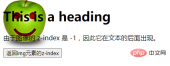
</style><h1>This is a heading</h1>
@@##@@
<p>由于图像的 z-index 是 -1,因此它在文本的后面出现。</p><div class="aritcle_card flexRow artxards">
											<div class="artcardd flexRow">
												<a class="aritcle_card_img" rel="nofollow" href="/xiazai/gongju/2331" title="jQuery 1.12.4"><img
														src="https://img.php.cn/upload/manual/001/431/639/6a21619eac924328.png" alt="jQuery 1.12.4" onerror="this.onerror='';this.src='/static/lhimages/moren/morentu.png'" ></a>
												<div class="aritcle_card_info flexColumn">
													<a rel="nofollow" href="/xiazai/gongju/2331" title="jQuery 1.12.4" class="overflowclass">jQuery 1.12.4</a>
													<p class="overflowclass">jQuery 1.12.4是jQuery 1.x系列的最后一个正式稳定版本,由jQuery团队于2016年发布。该版本主要面向需要兼容旧版浏览器环境的网站和Web应用,尤其适用于仍需支持Internet Explorer 6、Internet Explorer 7、Internet Explorer 8等老旧浏览器的项目。</p>
												</div>
												<a rel="nofollow" href="/xiazai/gongju/2331" title="jQuery 1.12.4" class="aritcle_card_btn flexRow flexcenter"><b></b><span>下载</span>
												</a>
											</div>
										</div>
<button>返回img元素的z-index</button>
输出结果:
点击按钮后:
相关视频教程推荐:jQuery视频教程



