本篇文章给大家带来的内容是关于php中json文件上传的方法介绍(代码示例),有一定的参考价值,有需要的朋友可以参考一下,希望对你有所帮助。
HTTP:一种超文本的传输协议,是计算机与计算机沟通的一种标准协议,现在一般为端与端之间的通信。
1、约定内容
请求/响应报文格式
请求方法 GET/POST
响应状态 200/404/302/304
预设的请求/响应头
PHP中的header函数用于设置响应头
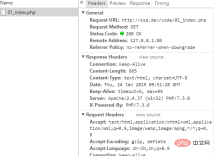
<?php
header('content-type:text/html');
?>
补充:
<?php
header('Location:01.php');
?>
客户端浏览器在接受到这个头信息后自动跳转到指定地址
JSON
JSON:类似于js字面量的表达数据的手段
JSON中属性名称必须用双引号
JSON中字符串必须用双引号(js的字符串可以用单引号)
JSON不允许注释
JSON数据类型
null:

Build MCP servers and clients for PHP applications with the official PHP SDK
下载
使用官方Model Context Protocol PHP SDK将PHP应用程序功能暴露为MCP工具、资源和提示,用于代理工作流。
null
string:
"ssq"
boolean:
ture
number:
12
object:
 {
    "name": "ssq",
    "age": 12,
    "gender": ture,
    "boyfrind": null
}
array:
["张三", "李四", "王五"]
JSON基本格式
var obj = [
    {"name": "ss", "age": 12, "email": "ssss", "url": "sssss.com", "images": ["./images/01.jpg"]},
    {"name": "ss", "age": 12, "email": "ssss", "url": "sssss.com", "images": ["./images/01.jpg"]},
    {"name": "ss", "age": 12, "email": "ssss", "url": "sssss.com", "images": ["./images/01.jpg"]},
    {"name": "ss", "age": 12, "email": "ssss", "url": "sssss.com", "images": ["./images/01.jpg"]},
    {"name": "ss", "age": 12, "email": "ssss", "url": "sssss.com", "images": ["./images/01.jpg"]}
]
JSON的转换
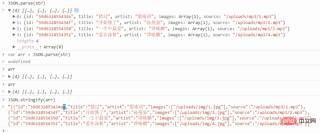
在php中对JSON反序列化
<?php $contents = file_get_contents('storage.json');
$data = json_decode($contents, true);
?>
及变成PHP中对象数组的形式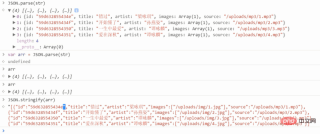
01实例展示
<?php // 获取文件中记录的数据,并展示到表格中(动态生成表格的HTML标签)
$contents = file_get_contents('storage.json');
// $contents => JSON 格式的字符串
// 把 JSON 格式的字符串转换为对象的过程叫做反序列化

// json_decode 默认反序列化时 将 JSON 中的对象转换为 PHP 中 stdClass 类型的对象
$data = json_decode($contents, true);
// $data => []

?>
html>


  <meta>
  <title>音乐列表</title>
  <link>
  <div>
    <h1>音乐列表</h1>
    <hr>
    <div>
      <a>添加</a>
    </div>
    <table>
      <thead>
        <tr>
          <th>标题</th>
          <th>歌手</th>
          <th>海报</th>
          <th>音乐</th>
          <th>操作</th>
        </tr>
      </thead>
      <tbody>
        <?php  foreach ($data as $item): ?>
        <tr>
          <td><?php  echo $item['title'] ?></td>
          <td><?php  echo $item['artist'] ?></td>
          <td>@@##@@" alt=""></td>
          <td><audio>" controls></audio></td>
          <td><button>删除</button></td>
        </tr>
        <?php  endforeach ?>
      </tbody>
    </table>
  </div>
效果图
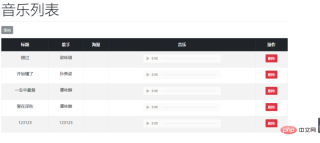
php免费学习视频:立即使用
踏上前端学习之旅,开启通往精通之路!从前端基础到项目实战,循序渐进,一步一个脚印,迈向巅峰!