





本篇文章给大家带来的内容是介绍tab切换之tab下拉显示效果(代码示例)。有一定的参考价值,有需要的朋友可以参考一下,希望对你们有所帮助。
html>


    <meta>
    <title>Document</title><style>
    *{
        padding: 0;
        margin: 0;
    }
    ul,li{
        list-style: none;
    }
    #warp{
        width: 600px;
        height: auto;
        margin: 0 auto;
        margin-top: 20px;
    }
    #warp .content p{
        width: 300px;
        height: 30px;
        background-color: #000;
        color: #fff;
        line-height: 30px;
        text-align: center;
    }
    #warp .content+ .content{
        margin-top: 2px;
    }
    #warp .content ul{
        display: none;
    }
    #warp .content ul.on{
        display: block;
    }
    #warp .content li{
        background-color: #ccc;
        width: 300px;
        text-align: center;
    }
    #warp .content li + li{
        margin-top: 1px;
    }
</style>
    <p>
        </p><p>
            </p><p>动物</p>
- 猴子
- 大象
- 狮子
山川
- 长江
- 黄河
- 井水
美女

从网页中提取schema.org、Open Graph和JSON-LD元数据以用于索引
下载
使用 extruct 从原始 HTML 中提取机器可读的元数据,以便代理可以在不依赖脆弱的全页解析的情况下对页面进行分类、去重或丰富。它最适合元数据采集工作流,而不适用于爬取整个网站或渲染 JavaScript 密集型页面。
- 貂蝉
- 西施
- 秀秀
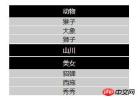
效果图: