微信小程序支付
list
-paddingleft-2">
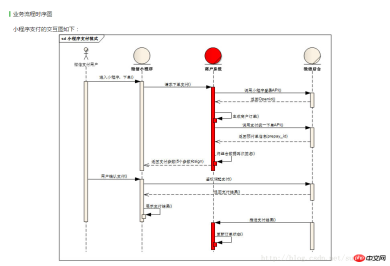
第一步
进入小程序,下单,请求下单支付,调用小程序登录API来获取Openid,生成商户订单,这些都是在小程序端完成的业务。
小程序端代码
// pages/pay/pay.jsvar app = getApp();
Page({
    data: {},
    onLoad: function (options) {
        // 页面初始化 options为页面跳转所带来的参数
    },    /* 微信支付 */
    wxpay: function () {
        var that = this
        //登陆获取code
        wx.login({
            success: function (res) {
                console.log(res.code)                //获取openid
                that.getOpenId(res.code)
            }
        });
    },
    getOpenId: function (code) {
        var that = this;
        wx.request({
            url: "https://api.weixin.qq.com/sns/jscode2session?appid=wxa142513e524e496c&secret=5d6a7d86048884e7c60f84f7aa85253c&js_code=" + code + "&grant_type=authorization_code",
            data: {},
            method: 'GET',
            success: function (res) {
                console.log('返回openId')
                console.log(res.data)
                that.generateOrder(res.data.openid)
            },
            fail: function () {
                // fail
            },
            complete: function () {
                // complete
            }
        })
    },    /**生成商户订单 */
    generateOrder: function (openid) {
        var that = this
        //统一支付
        wx.request({
            url: 'http://localhost:8070/RMS/pay_pay.action',
            method: 'GET',
            data: {
                total_fee: '5',
                body: '支付测试',
                attach:'真假酒水'
            },
            success: function (res) {
                console.log(res)                var pay = res.data                //发起支付
                var timeStamp = pay[0].timeStamp;
                console.log("timeStamp:"+timeStamp)                var packages = pay[0].package;
                console.log("package:"+packages)                var paySign = pay[0].paySign;
                console.log("paySign:"+paySign)                var nonceStr = pay[0].nonceStr;
                 console.log("nonceStr:"+nonceStr)                var param = { "timeStamp": timeStamp, "package": packages, "paySign": paySign, "signType": "MD5", "nonceStr": nonceStr };
                that.pay(param)
            },
        })
    },    /* 支付   */
    pay: function (param) {
        console.log("支付")
        console.log(param)
        wx.requestPayment({
            timeStamp: param.timeStamp,
            nonceStr: param.nonceStr,
            package: param.package,
            signType: param.signType,
            paySign: param.paySign,
            success: function (res) {
                // success
                console.log("支付")
                console.log(res)
                wx.navigateBack({
                    delta: 1, // 回退前 delta(默认为1) 页面
                    success: function (res) {
                        wx.showToast({
                            title: '支付成功',
                            icon: 'success',
                            duration: 2000
                        })
                    },
                    fail: function () {
                        // fail

                    },
                    complete: function () {
                        // complete
                    }
                })
            },
            fail: function (res) {
                // fail
                console.log("支付失败")
                console.log(res)
            },
            complete: function () {
                // complete
                console.log("pay complete")
            }
        })
    }
})
-
第二步
调用支付统一下单API来获取prepay_id,并将小程序调起支付数据需要签名的字段appId,timeStamp,nonceStr,package再次签名 微信小程序隐私权限调试下载
一站式排查小程序隐私授权报错(errno 104 / buttonId is wrong 等)+ 标准修改模式。适用:隐私协议配置、隐私弹窗不弹、授权报错、隐私接口调用失败。已抽离具体项目,适用于任何微信小程序。
后台代码
package cn.it.shop.action;import java.io.ByteArrayInputStream;import java.io.InputStream;import java.io.UnsupportedEncodingException;import java.text.SimpleDateFormat;import java.util.Date;import java.util.HashMap;import java.util.List;import java.util.Map;import org.dom4j.Document;import org.dom4j.DocumentException;import org.dom4j.Element;import org.dom4j.io.SAXReader;import cn.it.shop.util.MessageUtil;import cn.it.shop.util.PayUtil;import cn.it.shop.util.PaymentPo;import cn.it.shop.util.UUIDHexGenerator;import net.sf.json.JSONArray;import net.sf.json.JSONObject;/**
* @author
* @version 创建时间:2017年1月21日 下午4:59:03
* 小程序端请求的后台action,返回签名后的数据传到前台
*/public class PayAction {    private String total_fee;//总金额
    private String body;//商品描述
    private String detail;//商品详情
    private String attach;//附加数据
    private String time_start;//交易起始时间
    private String time_expire;//交易结束时间
    private String openid;//用户标识

    private JSONArray jsonArray=new JSONArray();    public String pay() throws UnsupportedEncodingException, DocumentException{

         body = new String(body.getBytes("UTF-8"),"ISO-8859-1");
        String appid = "替换为自己的小程序ID";//小程序ID
        String mch_id = "替换为自己的商户号";//商户号
        String nonce_str = UUIDHexGenerator.generate();//随机字符串
        String today = new SimpleDateFormat("yyyyMMddHHmmss").format(new Date());        String code = PayUtil.createCode(8);        String out_trade_no = mch_id+today+code;//商户订单号
        String spbill_create_ip = "替换为自己的终端IP";//终端IP
        String notify_url = "http://www.weixin.qq.com/wxpay/pay.php";//通知地址
        String trade_type = "JSAPI";//交易类型
        String openid="替换为用户的openid";//用户标识

        /**/
        PaymentPo paymentPo = new PaymentPo();

        paymentPo.setAppid(appid);
        paymentPo.setMch_id(mch_id);
        paymentPo.setNonce_str(nonce_str);        String newbody=new String(body.getBytes("ISO-8859-1"),"UTF-8");//以utf-8编码放入paymentPo,微信支付要求字符编码统一采用UTF-8字符编码
        paymentPo.setBody(newbody);
        paymentPo.setOut_trade_no(out_trade_no);
        paymentPo.setTotal_fee(total_fee);
        paymentPo.setSpbill_create_ip(spbill_create_ip);
        paymentPo.setNotify_url(notify_url);
        paymentPo.setTrade_type(trade_type);
        paymentPo.setOpenid(openid);        // 把请求参数打包成数组
        Map<string> sParaTemp = new HashMap<string>();
        sParaTemp.put("appid", paymentPo.getAppid());
        sParaTemp.put("mch_id", paymentPo.getMch_id());
        sParaTemp.put("nonce_str", paymentPo.getNonce_str());
        sParaTemp.put("body",  paymentPo.getBody());
        sParaTemp.put("out_trade_no", paymentPo.getOut_trade_no());
        sParaTemp.put("total_fee",paymentPo.getTotal_fee());
        sParaTemp.put("spbill_create_ip", paymentPo.getSpbill_create_ip());
        sParaTemp.put("notify_url",paymentPo.getNotify_url());
        sParaTemp.put("trade_type", paymentPo.getTrade_type());
        sParaTemp.put("openid", paymentPo.getOpenid());        // 除去数组中的空值和签名参数
        Map<string> sPara = PayUtil.paraFilter(sParaTemp);        String prestr = PayUtil.createLinkString(sPara); // 把数组所有元素,按照“参数=参数值”的模式用“&”字符拼接成字符串
        String key = "&key=替换为商户支付密钥"; // 商户支付密钥
        //MD5运算生成签名
        String mysign = PayUtil.sign(prestr, key, "utf-8").toUpperCase();
        paymentPo.setSign(mysign);        //打包要发送的xml
        String respXml = MessageUtil.messageToXML(paymentPo);        // 打印respXml发现,得到的xml中有“”不对,应该替换成“_”
        respXml = respXml.replace(, "_");        String url = "https://api.mch.weixin.qq.com/pay/unifiedorder";//统一下单API接口链接
        String param = respXml;        //String result = SendRequestForUrl.sendRequest(url, param);//发起请求
        String result =PayUtil.httpRequest(url, "POST", param);        // 将解析结果存储在HashMap中
        Map<string> map = new HashMap<string>();
         InputStream in=new ByteArrayInputStream(result.getBytes());
        // 读取输入流
        SAXReader reader = new SAXReader();
        Document document = reader.read(in);        // 得到xml根元素
        Element root = document.getRootElement();        // 得到根元素的所有子节点
        @SuppressWarnings("unchecked")        List<element> elementList = root.elements();
        for (Element element : elementList) {            map.put(element.getName(), element.getText());
        }        // 返回信息
        String return_code = map.get("return_code");//返回状态码
        String return_msg = map.get("return_msg");//返回信息
        System.out.println("return_msg"+return_msg);
        JSONObject JsonObject=new JSONObject() ;        if(return_code=="SUCCESS"||return_code.equals(return_code)){            // 业务结果
            String prepay_id = map.get("prepay_id");//返回的预付单信息
            String nonceStr=UUIDHexGenerator.generate();
            JsonObject.put("nonceStr", nonceStr);
            JsonObject.put("package", "prepay_id="+prepay_id);
            Long timeStamp= System.currentTimeMillis()/1000;
            JsonObject.put("timeStamp", timeStamp+"");            String stringSignTemp = "appId="+appid+"&nonceStr=" + nonceStr + "&package=prepay_id=" + prepay_id+ "&signType=MD5&timeStamp=" + timeStamp;            //再次签名
            String paySign=PayUtil.sign(stringSignTemp, "&key=替换为自己的密钥", "utf-8").toUpperCase();
            JsonObject.put("paySign", paySign);
            jsonArray.add(JsonObject);
        }        return "pay";

    }    public String getTotal_fee() {        return total_fee;
    }    public void setTotal_fee(String total_fee) {
        this.total_fee = total_fee;
    }    public String getBody() {        return body;
    }    public void setBody(String body) {
        this.body = body;
    }    public JSONArray getJsonArray() {        return jsonArray;
    }    public void setJsonArray(JSONArray jsonArray) {
        this.jsonArray = jsonArray;
    }    public String getDetail() {        return detail;
    }    public void setDetail(String detail) {
        this.detail = detail;
    }    public String getAttach() {        return attach;
    }    public void setAttach(String attach) {
        this.attach = attach;
    }    public String getTime_start() {        return time_start;
    }    public void setTime_start(String time_start) {
        this.time_start = time_start;
    }    public String getTime_expire() {        return time_expire;
    }    public void setTime_expire(String time_expire) {
        this.time_expire = time_expire;
    }    public String getOpenid() {        return openid;
    }    public void setOpenid(String openid) {
        this.openid = openid;
    }
}</element></string></string></string></string></string>
后台业务逻辑涉及到的工具类及参数封装类
MessageUtil
package cn.it.shop.util;import java.io.IOException;import java.io.Writer;import java.util.HashMap;import java.util.List;import javax.servlet.http.HttpServletRequest;import org.dom4j.Document;import org.dom4j.Element;import org.dom4j.io.SAXReader;import com.thoughtworks.xstream.XStream;import com.thoughtworks.xstream.core.util.QuickWriter;import com.thoughtworks.xstream.io.HierarchicalStreamWriter;import com.thoughtworks.xstream.io.xml.PrettyPrintWriter;import com.thoughtworks.xstream.io.xml.XppDriver;public class MessageUtil {

    public static HashMap<string> parseXML(HttpServletRequest request) throws Exception, IOException{
        HashMap<string> map=new HashMap<string>();        // 通过IO获得Document
        SAXReader reader = new SAXReader();
        Document doc = reader.read(request.getInputStream());        //得到xml的根节点
        Element root=doc.getRootElement();
        recursiveParseXML(root,map);        return map;
    }    private static void recursiveParseXML(Element root,HashMap<string> map){        //得到根节点的子节点列表
        List<element> elementList=root.elements();        //判断有没有子元素列表
        if(elementList.size()==0){
            map.put(root.getName(), root.getTextTrim());
        }        else{            //遍历
            for(Element e:elementList){
                recursiveParseXML(e,map);
            }
        }
    }    private static XStream xstream = new XStream(new XppDriver() {        public HierarchicalStreamWriter createWriter(Writer out) {            return new PrettyPrintWriter(out) {                // 对所有xml节点都增加CDATA标记
                boolean cdata = true;                public void startNode(String name, Class clazz) {                    super.startNode(name, clazz);
                }                protected void writeText(QuickWriter writer, String text) {                    if (cdata) {
                        writer.write("");
                    } else {
                        writer.write(text);
                    }
                }
            };
        }
    });    public static String messageToXML(PaymentPo paymentPo){
        xstream.alias("xml",PaymentPo.class);        return xstream.toXML(paymentPo);
    }
}

PaymentPo//封装支付参数实体package cn.it.shop.util;/**
* @author * @version 创建时间:2017年1月21日 下午4:20:52
* 类说明
*/public class PaymentPo {
    private String appid;//小程序ID
    private String mch_id;//商户号
    private String device_info;//设备号
    private String nonce_str;//随机字符串
    private String sign;//签名
    private String body;//商品描述
    private String detail;//商品详情
    private String attach;//附加数据
    private String out_trade_no;//商户订单号
    private String fee_type;//货币类型
    private String spbill_create_ip;//终端IP
    private String time_start;//交易起始时间
    private String time_expire;//交易结束时间
    private String goods_tag;//商品标记
    private String total_fee;//总金额
    private String notify_url;//通知地址
    private String trade_type;//交易类型
    private String limit_pay;//指定支付方式
    private String openid;//用户标识
    public String getAppid() {        return appid;
    }    public void setAppid(String appid) {        this.appid = appid;
    }    public String getMch_id() {        return mch_id;
    }    public void setMch_id(String mch_id) {        this.mch_id = mch_id;
    }    public String getNonce_str() {        return nonce_str;
    }    public void setNonce_str(String nonce_str) {        this.nonce_str = nonce_str;
    }    public String getSign() {        return sign;
    }    public void setSign(String sign) {        this.sign = sign;
    }    public String getBody() {        return body;
    }    public void setBody(String body) {        this.body = body;
    }    public String getOut_trade_no() {        return out_trade_no;
    }    public void setOut_trade_no(String out_trade_no) {        this.out_trade_no = out_trade_no;
    }    public String getTotal_fee() {        return total_fee;
    }    public void setTotal_fee(String total_fee) {        this.total_fee = total_fee;
    }    public String getNotify_url() {        return notify_url;
    }    public void setNotify_url(String notify_url) {        this.notify_url = notify_url;
    }    public String getTrade_type() {        return trade_type;
    }    public void setTrade_type(String trade_type) {        this.trade_type = trade_type;
    }    public String getOpenid() {        return openid;
    }    public void setOpenid(String openid) {        this.openid = openid;
    }    public String getSpbill_create_ip() {        return spbill_create_ip;
    }    public void setSpbill_create_ip(String spbill_create_ip) {        this.spbill_create_ip = spbill_create_ip;
    }    public String getDevice_info() {        return device_info;
    }    public void setDevice_info(String device_info) {        this.device_info = device_info;
    }    public String getDetail() {        return detail;
    }    public void setDetail(String detail) {        this.detail = detail;
    }    public String getAttach() {        return attach;
    }    public void setAttach(String attach) {        this.attach = attach;
    }    public String getFee_type() {        return fee_type;
    }    public void setFee_type(String fee_type) {        this.fee_type = fee_type;
    }    public String getTime_start() {        return time_start;
    }    public void setTime_start(String time_start) {        this.time_start = time_start;
    }    public String getTime_expire() {        return time_expire;
    }    public void setTime_expire(String time_expire) {        this.time_expire = time_expire;
    }    public String getGoods_tag() {        return goods_tag;
    }    public void setGoods_tag(String goods_tag) {        this.goods_tag = goods_tag;
    }    public String getLimit_pay() {        return limit_pay;
    }    public void setLimit_pay(String limit_pay) {        this.limit_pay = limit_pay;
    }

}
PayUtilpackage cn.it.shop.util;import java.io.BufferedReader;import java.io.InputStream;import java.io.InputStreamReader;import java.io.OutputStream;import java.io.UnsupportedEncodingException;import java.net.HttpURLConnection;import java.net.URL;import java.util.ArrayList;import java.util.Collections;import java.util.HashMap;import java.util.List;import java.util.Map;import org.apache.commons.codec.digest.DigestUtils;/**
 * @author
 * @version 创建时间:2017年1月17日 下午7:46:29 类说明
 */public class PayUtil {
    /**
     * 签名字符串
     * @param text需要签名的字符串
     * @param key 密钥
     * @param input_charset编码格式
     * @return 签名结果
     */
    public static String sign(String text, String key, String input_charset) {
        text = text + key;        return DigestUtils.md5Hex(getContentBytes(text, input_charset));
    }    /**
     * 签名字符串
     *  @param text需要签名的字符串
     * @param sign 签名结果
     * @param key密钥
     * @param input_charset 编码格式
     * @return 签名结果
     */
    public static boolean verify(String text, String sign, String key, String input_charset) {
        text = text + key;
        String mysign = DigestUtils.md5Hex(getContentBytes(text, input_charset));        if (mysign.equals(sign)) {            return true;
        } else {            return false;
        }
    }    /**
     * @param content
     * @param charset
     * @return
     * @throws SignatureException
     * @throws UnsupportedEncodingException
     */
    public static byte[] getContentBytes(String content, String charset) {        if (charset == null || "".equals(charset)) {            return content.getBytes();
        }        try {            return content.getBytes(charset);
        } catch (UnsupportedEncodingException e) {            throw new RuntimeException("MD5签名过程中出现错误,指定的编码集不对,您目前指定的编码集是:" + charset);
        }
    }    /**
     * 生成6位或10位随机数 param codeLength(多少位)
     * @return
     */
    public static String createCode(int codeLength) {
        String code = "";        for (int i = 0; i = '0' && ch = 'A' && ch = 'a' && ch = 0x4e00 && ch = 0x8000 && ch  paraFilter(Map<string> sArray) {
        Map<string> result = new HashMap<string>();        if (sArray == null || sArray.size()  params) {
        List<string> keys = new ArrayList<string>(params.keySet());
        Collections.sort(keys);

        String prestr = "";        for (int i = 0; i >> 8);    private static UUIDHexGenerator uuidgen = new UUIDHexGenerator();    static {        int ipadd;        try {
            ipadd = toInt(InetAddress.getLocalHost().getAddress());
        } catch (Exception e) {
            ipadd = 0;
        }
        IP = ipadd;
    }    public static UUIDHexGenerator getInstance() {        return uuidgen;
    }    public static int toInt(byte[] bytes) {        int result = 0;        for (int i = 0; i >> 32);
    }    protected static int getLoTime() {        return (int) System.currentTimeMillis();
    }    public static String generate() {        return new StringBuffer(36).append(format(getIP())).append(sep).append(format(getJVM())).append(sep)
                .append(format(getHiTime())).append(sep).append(format(getLoTime())).append(sep)
                .append(format(getCount())).toString();
    }    /**
     * @param args
     */
    public static void main(String[] args) {
        String id="";
        UUIDHexGenerator uuid = UUIDHexGenerator.getInstance();        /*
        for (int i = 0; i <p>第一次写,写的不是太完整,希望同大家多多交流,一起进步。</p></string></string></string></string></string></element></string></string></string></string>